GPT Engineer
Ersteinrichtung
Installtion
Beschreibung:
GPT Engineer läuft auf jeder Platform die python3 unterstützt
Vorrausetzungen:
- python3
- Wer möchte python-is-python3. Damit wird python3 als standard interpreter aufgerufen.
Wer noch Version 2 und 3 benötigt, überspringt dieses. - pip3
- einen openai API-Key (Hier anlegen : https://platform.openai.com/account/api-keys )
Installation der Abbhänhigkeiten
apt install python3 python3-pip
Optional
apt install python-is-python3
Installation gpt-engineer
pip3 install gpt-engineer
Ausgabe:
Ausgabe Installation
Defaulting to user installation because normal site-packages is not writeable
Collecting gpt-engineer
Downloading gpt_engineer-0.0.8-py3-none-any.whl (19 kB)
Collecting mypy==1.3.0
Downloading mypy-1.3.0-cp310-cp310-manylinux_2_17_x86_64.manylinux2014_x86_64.whl (12.2 MB)
━━━━━━━━━━━━━━━━━━━━━━━━━━━━━━━━━━━━━━━━ 12.2/12.2 MB 42.6 MB/s eta 0:00:00
Collecting dataclasses-json==0.5.7
Downloading dataclasses_json-0.5.7-py3-none-any.whl (25 kB)
Collecting ruff==0.0.272
Downloading ruff-0.0.272-py3-none-manylinux_2_17_x86_64.manylinux2014_x86_64.whl (5.9 MB)
━━━━━━━━━━━━━━━━━━━━━━━━━━━━━━━━━━━━━━━━ 5.9/5.9 MB 39.2 MB/s eta 0:00:00
Collecting rudder-sdk-python==2.0.2
Downloading rudder_sdk_python-2.0.2-py2.py3-none-any.whl (19 kB)
Requirement already satisfied: termcolor==2.3.0 in ./.local/lib/python3.10/site-packages (from gpt-engineer) (2.3.0)
Requirement already satisfied: typer>=0.3.2 in ./.local/lib/python3.10/site-packages (from gpt-engineer) (0.7.0)
Requirement already satisfied: black==23.3.0 in ./.local/lib/python3.10/site-packages (from gpt-engineer) (23.3.0)
Collecting pre-commit==3.3.3
Downloading pre_commit-3.3.3-py2.py3-none-any.whl (202 kB)
━━━━━━━━━━━━━━━━━━━━━━━━━━━━━━━━━━━━━━ 202.8/202.8 KB 34.3 MB/s eta 0:00:00
Collecting tabulate==0.9.0
Downloading tabulate-0.9.0-py3-none-any.whl (35 kB)
Requirement already satisfied: tiktoken>=0.0.4 in ./.local/lib/python3.10/site-packages (from gpt-engineer) (0.3.3)
Collecting langchain>=0.0.240
Downloading langchain-0.0.263-py3-none-any.whl (1.5 MB)
━━━━━━━━━━━━━━━━━━━━━━━━━━━━━━━━━━━━━━━━ 1.5/1.5 MB 50.3 MB/s eta 0:00:00
Requirement already satisfied: pytest==7.3.1 in ./.local/lib/python3.10/site-packages (from gpt-engineer) (7.3.1)
Requirement already satisfied: click>=8.0.0 in ./.local/lib/python3.10/site-packages (from gpt-engineer) (8.1.3)
Collecting openai==0.27.8
Downloading openai-0.27.8-py3-none-any.whl (73 kB)
━━━━━━━━━━━━━━━━━━━━━━━━━━━━━━━━━━━━━━━━ 73.6/73.6 KB 12.4 MB/s eta 0:00:00
Requirement already satisfied: pathspec>=0.9.0 in ./.local/lib/python3.10/site-packages (from black==23.3.0->gpt-engineer) (0.11.1)
Requirement already satisfied: packaging>=22.0 in ./.local/lib/python3.10/site-packages (from black==23.3.0->gpt-engineer) (23.1)
Requirement already satisfied: platformdirs>=2 in ./.local/lib/python3.10/site-packages (from black==23.3.0->gpt-engineer) (3.2.0)
Requirement already satisfied: tomli>=1.1.0 in ./.local/lib/python3.10/site-packages (from black==23.3.0->gpt-engineer) (2.0.1)
Requirement already satisfied: mypy-extensions>=0.4.3 in ./.local/lib/python3.10/site-packages (from black==23.3.0->gpt-engineer) (1.0.0)
Collecting marshmallow-enum<2.0.0,>=1.5.1
Downloading marshmallow_enum-1.5.1-py2.py3-none-any.whl (4.2 kB)
Collecting marshmallow<4.0.0,>=3.3.0
Downloading marshmallow-3.20.1-py3-none-any.whl (49 kB)
━━━━━━━━━━━━━━━━━━━━━━━━━━━━━━━━━━━━━━━━ 49.4/49.4 KB 7.9 MB/s eta 0:00:00
Collecting typing-inspect>=0.4.0
Downloading typing_inspect-0.9.0-py3-none-any.whl (8.8 kB)
Requirement already satisfied: typing-extensions>=3.10 in ./.local/lib/python3.10/site-packages (from mypy==1.3.0->gpt-engineer) (4.5.0)
Requirement already satisfied: requests>=2.20 in ./.local/lib/python3.10/site-packages (from openai==0.27.8->gpt-engineer) (2.28.2)
Requirement already satisfied: tqdm in ./.local/lib/python3.10/site-packages (from openai==0.27.8->gpt-engineer) (4.65.0)
Requirement already satisfied: aiohttp in ./.local/lib/python3.10/site-packages (from openai==0.27.8->gpt-engineer) (3.8.4)
Requirement already satisfied: cfgv>=2.0.0 in ./.local/lib/python3.10/site-packages (from pre-commit==3.3.3->gpt-engineer) (3.3.1)
Requirement already satisfied: pyyaml>=5.1 in ./.local/lib/python3.10/site-packages (from pre-commit==3.3.3->gpt-engineer) (6.0)
Requirement already satisfied: nodeenv>=0.11.1 in ./.local/lib/python3.10/site-packages (from pre-commit==3.3.3->gpt-engineer) (1.7.0)
Requirement already satisfied: virtualenv>=20.10.0 in ./.local/lib/python3.10/site-packages (from pre-commit==3.3.3->gpt-engineer) (20.22.0)
Requirement already satisfied: identify>=1.0.0 in ./.local/lib/python3.10/site-packages (from pre-commit==3.3.3->gpt-engineer) (2.5.22)
Requirement already satisfied: exceptiongroup>=1.0.0rc8 in ./.local/lib/python3.10/site-packages (from pytest==7.3.1->gpt-engineer) (1.1.1)
Requirement already satisfied: pluggy<2.0,>=0.12 in ./.local/lib/python3.10/site-packages (from pytest==7.3.1->gpt-engineer) (1.0.0)
Requirement already satisfied: iniconfig in ./.local/lib/python3.10/site-packages (from pytest==7.3.1->gpt-engineer) (2.0.0)
Collecting backoff~=2.1
Downloading backoff-2.2.1-py3-none-any.whl (15 kB)
Collecting deprecation~=2.0.6
Downloading deprecation-2.0.7-py2.py3-none-any.whl (11 kB)
Collecting python-dotenv~=0.21.0
Downloading python_dotenv-0.21.1-py3-none-any.whl (19 kB)
Collecting monotonic~=1.5
Downloading monotonic-1.6-py2.py3-none-any.whl (8.2 kB)
Requirement already satisfied: python-dateutil~=2.2 in ./.local/lib/python3.10/site-packages (from rudder-sdk-python==2.0.2->gpt-engineer) (2.8.2)
Requirement already satisfied: numpy<2,>=1 in ./.local/lib/python3.10/site-packages (from langchain>=0.0.240->gpt-engineer) (1.24.3)
Collecting tenacity<9.0.0,>=8.1.0
Downloading tenacity-8.2.2-py3-none-any.whl (24 kB)
Requirement already satisfied: async-timeout<5.0.0,>=4.0.0 in ./.local/lib/python3.10/site-packages (from langchain>=0.0.240->gpt-engineer) (4.0.2)
Collecting numexpr<3.0.0,>=2.8.4
Downloading numexpr-2.8.5-cp310-cp310-manylinux_2_17_x86_64.manylinux2014_x86_64.whl (383 kB)
━━━━━━━━━━━━━━━━━━━━━━━━━━━━━━━━━━━━━━ 383.2/383.2 KB 16.5 MB/s eta 0:00:00
Collecting SQLAlchemy<3,>=1.4
Downloading SQLAlchemy-2.0.19-cp310-cp310-manylinux_2_17_x86_64.manylinux2014_x86_64.whl (2.7 MB)
━━━━━━━━━━━━━━━━━━━━━━━━━━━━━━━━━━━━━━━━ 2.7/2.7 MB 38.6 MB/s eta 0:00:00
Collecting langsmith<0.1.0,>=0.0.11
Downloading langsmith-0.0.22-py3-none-any.whl (32 kB)
Requirement already satisfied: pydantic<2,>=1 in ./.local/lib/python3.10/site-packages (from langchain>=0.0.240->gpt-engineer) (1.10.7)
Collecting openapi-schema-pydantic<2.0,>=1.2
Downloading openapi_schema_pydantic-1.2.4-py3-none-any.whl (90 kB)
━━━━━━━━━━━━━━━━━━━━━━━━━━━━━━━━━━━━━━━━ 90.0/90.0 KB 18.4 MB/s eta 0:00:00
Requirement already satisfied: regex>=2022.1.18 in ./.local/lib/python3.10/site-packages (from tiktoken>=0.0.4->gpt-engineer) (2023.3.23)
Requirement already satisfied: aiosignal>=1.1.2 in ./.local/lib/python3.10/site-packages (from aiohttp->openai==0.27.8->gpt-engineer) (1.3.1)
Requirement already satisfied: multidict<7.0,>=4.5 in ./.local/lib/python3.10/site-packages (from aiohttp->openai==0.27.8->gpt-engineer) (6.0.4)
Requirement already satisfied: attrs>=17.3.0 in /usr/lib/python3/dist-packages (from aiohttp->openai==0.27.8->gpt-engineer) (21.2.0)
Requirement already satisfied: yarl<2.0,>=1.0 in ./.local/lib/python3.10/site-packages (from aiohttp->openai==0.27.8->gpt-engineer) (1.9.1)
Requirement already satisfied: frozenlist>=1.1.1 in ./.local/lib/python3.10/site-packages (from aiohttp->openai==0.27.8->gpt-engineer) (1.3.3)
Requirement already satisfied: charset-normalizer<4.0,>=2.0 in ./.local/lib/python3.10/site-packages (from aiohttp->openai==0.27.8->gpt-engineer) (3.1.0)
Requirement already satisfied: setuptools in /usr/lib/python3/dist-packages (from nodeenv>=0.11.1->pre-commit==3.3.3->gpt-engineer) (59.6.0)
Requirement already satisfied: six>=1.5 in /usr/lib/python3/dist-packages (from python-dateutil~=2.2->rudder-sdk-python==2.0.2->gpt-engineer) (1.16.0)
Requirement already satisfied: idna<4,>=2.5 in /usr/lib/python3/dist-packages (from requests>=2.20->openai==0.27.8->gpt-engineer) (3.3)
Requirement already satisfied: urllib3<1.27,>=1.21.1 in /usr/lib/python3/dist-packages (from requests>=2.20->openai==0.27.8->gpt-engineer) (1.26.5)
Requirement already satisfied: certifi>=2017.4.17 in ./.local/lib/python3.10/site-packages (from requests>=2.20->openai==0.27.8->gpt-engineer) (2022.12.7)
Collecting greenlet!=0.4.17
Downloading greenlet-2.0.2-cp310-cp310-manylinux_2_17_x86_64.manylinux2014_x86_64.whl (613 kB)
━━━━━━━━━━━━━━━━━━━━━━━━━━━━━━━━━━━━━━ 613.7/613.7 KB 25.4 MB/s eta 0:00:00
Requirement already satisfied: filelock<4,>=3.11 in ./.local/lib/python3.10/site-packages (from virtualenv>=20.10.0->pre-commit==3.3.3->gpt-engineer) (3.12.0)
Requirement already satisfied: distlib<1,>=0.3.6 in ./.local/lib/python3.10/site-packages (from virtualenv>=20.10.0->pre-commit==3.3.3->gpt-engineer) (0.3.6)
Installing collected packages: monotonic, typing-inspect, tenacity, tabulate, ruff, python-dotenv, numexpr, mypy, marshmallow, greenlet, deprecation, backoff, SQLAlchemy, rudder-sdk-python, pre-commit, openapi-schema-pydantic, marshmallow-enum, langsmith, openai, dataclasses-json, langchain, gpt-engineer
Attempting uninstall: python-dotenv
Found existing installation: python-dotenv 1.0.0
Uninstalling python-dotenv-1.0.0:
Successfully uninstalled python-dotenv-1.0.0
Attempting uninstall: pre-commit
Found existing installation: pre-commit 3.2.2
Uninstalling pre-commit-3.2.2:
Successfully uninstalled pre-commit-3.2.2
Attempting uninstall: openai
Found existing installation: openai 0.27.2
Uninstalling openai-0.27.2:
Successfully uninstalled openai-0.27.2
Successfully installed SQLAlchemy-2.0.19 backoff-2.2.1 dataclasses-json-0.5.7 deprecation-2.0.7 gpt-engineer-0.0.8 greenlet-2.0.2 langchain-0.0.263 langsmith-0.0.22 marshmallow-3.20.1 marshmallow-enum-1.5.1 monotonic-1.6 mypy-1.3.0 numexpr-2.8.5 openai-0.27.8 openapi-schema-pydantic-1.2.4 pre-commit-3.3.3 python-dotenv-0.21.1 rudder-sdk-python-2.0.2 ruff-0.0.272 tabulate-0.9.0 tenacity-8.2.2 typing-inspect-0.9.0
Nun ein Programmordner erstellen. Da kommt unsere API-KEy script rein und unsere Projekte
mkdir /home/<benutzername>/gpt-engineerDamit wäre die Eigentliche Installation abgeschlossen.
API-Key Script
API Key in skript hinterlegen. Diese muss dann nur noch vor Benutzung aufgerufen werden.
nano /home/<benutzername>/gpt-engineer/apikey.shInhalt
#!/bin/bash
export OPEN_AI_API_KEY=<dein_key>
ausführbar machen
chmod +x /home/<benutzername>/gpt-engineer/apikey.shDamit wäre die Installtion abgeschlossen.
Bedienung
Einstieg erstes kleines Programm
Beschreibung:
Wir erstellen hier erstmal ein kleines Programm zum einstieg.
Los gehts:
In unserem Programmordner erstellen wir ein neues Verzeichnis für unser Programm.
Wir wollen ein Tetris Spiel kreieren. Also nennen wir das Verzeichnis Tetris
mkdir /home/<benutzername>/gpt-engineer/tetrisIn diesem Verzeichnis erstellen wir eine Datei in der wir unsere Beschreibung so gut es geht rein packen.
Denn aus der Beschreibung baut uns die KI das Programm.
Am besten man schreibt die prompts in Englisch. ChatGTP versteht auch Deutsch aber in Englisch versteht es meist besser.
Wir nutzen hier den texteditor, weil es sich darin besser schreiben lässt. Aber es kann natürlich auch Nano verwendet werden
touch /home/<benutzername>/gpt-engineer/tetris/prompt
open /home/<benutzername>/gpt-engineer/tetris/prompt
Inhalt
Ein kleines Multiplayer tetris spiel. Speichern
create an tetris game that could play on an single computer in single player an multiplayer splitscreen.
To control the blocks the first player use W to rotate and A S D to move the block and the second player
use the keys I to rotate the block and J K L to move the block.
at end game the winner can enter his name to save in the highscore.
please encrypt the highscore file with base64
The mainmenu items are singleplayer, multiplayer, highscore, exit
The pgramming language is python
Ausführen
Dazu gehen wir wieder in unsere Programmverzeichnis zurück
cd /home/<benutzername>/gpt-engineer/Nun den Befehl ausführen.
Das API KEY script brauchen wir nur einmal in der Terminalsitzung ausführen. Wird das Terminal geschlossen müssen wir das natürlich nochmals machen
source apikey.shALs Paramter wird das Projektverzeichnis übergeben, hier unser Tetris
gpt-engineer tetrisNun bekommen wir ein paar fragen:
Areas that need clarification:
1. Are there any specific requirements for the Tetris game, such as the number of levels or scoring system?
2. How should the multiplayer splitscreen be implemented? Should both players be able to see each other's game boards?
3. How should the highscore file be encrypted with base64? Should it be encrypted when saving or when reading the file?
4. Should the highscore file be a separate file or integrated within the game program?
5. Are there any specific design requirements for the main menu, such as the layout or appearance?
6. Are there any specific libraries or frameworks that should be used for developing the game in Python?
(answer in text, or "c" to move on)
unsere Beispiel Antworten. Immer eine Antwort einegeben er frag nacheinander ab.
1. 15 Levels
2. Both Player can see because is one monitor
3. The file should encrypted when save and decrypted when reading to show the values
4. yes
5. no
6. please use no specific frameworks
Nun wird code generiert...
Zum Schluss fragt er usn ob der Code läuft, das wissen wir noch nicht. Deswegen öffnen wir in einer zweiten schell unser programmordner uns lassen das Programm starten um nachher die Frage zu beantworten.
Die Frage sieht übrigends so aus:
id the generated code run at all? y/n/u(ncertain):
Die Projektstruktur
Das Verzeichnis sieht so aus
~/gpt-engineer/tetris$ ls
archive  memory  prompt  workspace
In workspace ist unser code, dort gehen wir ein
cd ~/gpt-engineer/tetris/workspaceDer Inhalt
all_output.txt  highscore.py  player.py  run.sh
block.py        main.py       README.md  tetris_game.py
Mit der run.sh können wir das Programm starten.
Dieses muss aber noch ausführbar gemacht werden, denn das hat gpt nicht für uns gemacht
chmod +x run.pyNun starten
./run.shWie wir sehen hat das nicht ganz geklappt
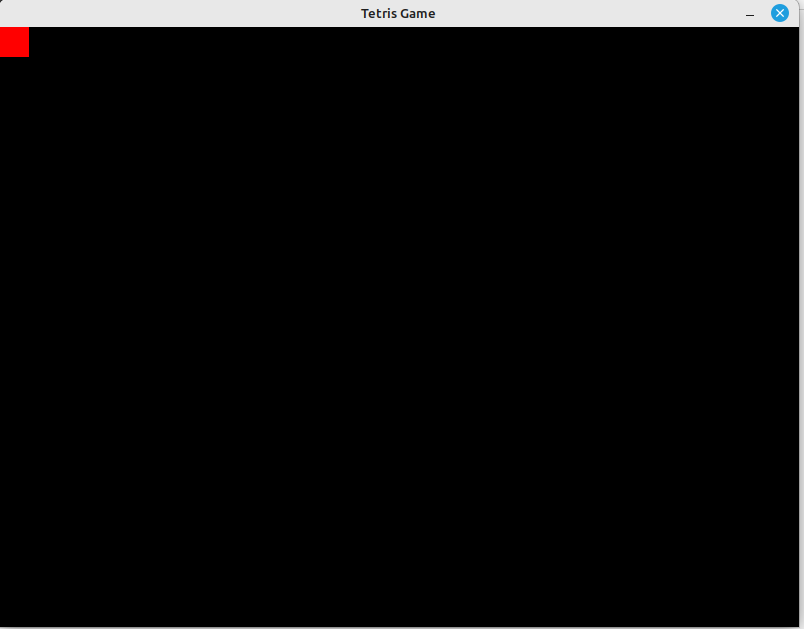
Also beantworten wir die Frage mit nein.
Nun werden wir gefragt was nicht geht.
If you have time, please explain what was not working (ok to leave blank)

Unsere Antwort
Only black Windows with an red block in the left op edge, no menuü or other things.
Nun die nächste Frage ob es okay das sie die promts speichern? Da hier jetzt keine Persönlichen Daten drin sind sag ich ja
Is it ok if we store your prompts to learn? (y/n)
y
Wir führen das script nochmal aus zum generieren.
Wir bekommen weitere Fragen gestellt.