Konfiguration
Ersteinrichtung
Beschreibung:
Anmelden an der Oberfläche und weitere Black Listen importieren.
Anmeldung:
im Browser die IP Adresse des PiHole eingeben und anmelden
http://ip_adresse/admin
Kennwort : euer Kennwort was im Installer ausgegeben wurde oder hat ein eigenes gesetzt.
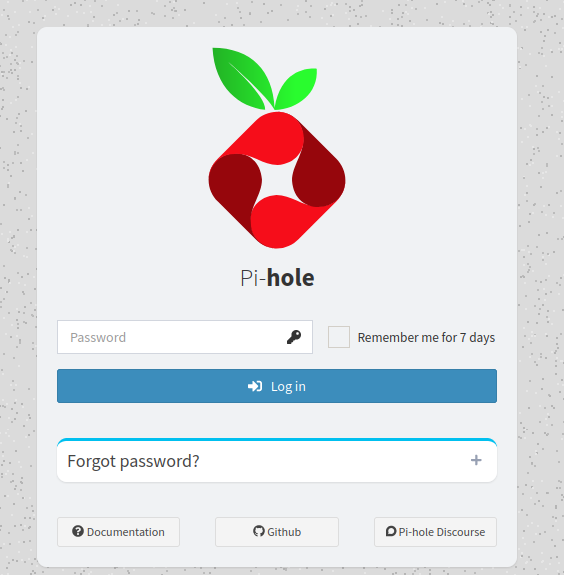
Nun sind wir auf dem Dashboard. Dort haben wir eine Schnellstatitsik, wie viel schon geblockt wurde

Weitere Listen hinzufügen.
Dazu klicken wir im Menü auf Adlists
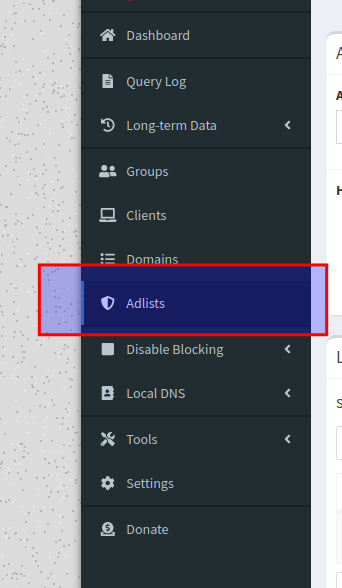
Nun können wir hier neue Listen hinzufügen.
Adlist listen sind github repos.
So wird immer die aktuellste Version verwendet
2 Anbieter die sehr beliebt sind.
Die erste Liste haben wir ja schon mit Installiert.
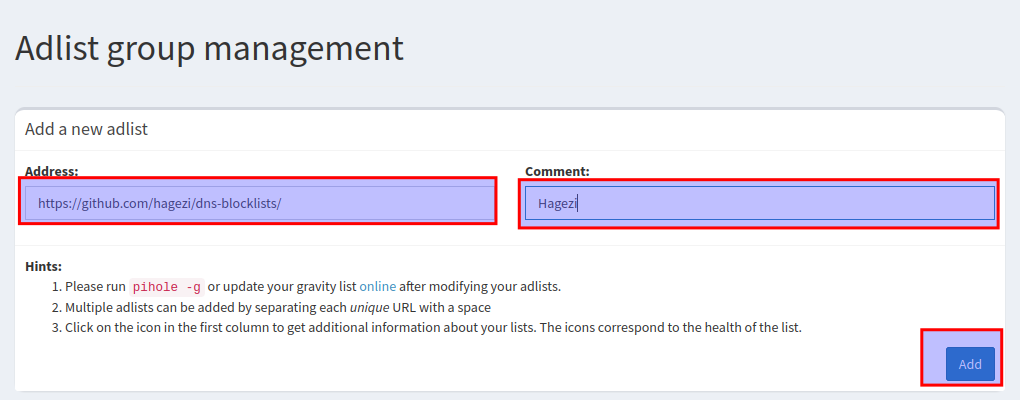
Oben kann die Url für die neue Liste eingetragen werden und einen Namen dafür wenn man möchte
Man fügt immer den oderner hosts hinzu.
Einfach im github weseite in das Verzeichnis gehen dann die Url rauskopieren für hagezz:
Alles ab der # weglöschen (Ori URL : https://github.com/hagezi/dns-blocklists#orange_book-multi-pro---maximum-protection-)
https://github.com/hagezi/dns-blocklistsDiese fügen wir ins Textfeld ein und geben Ihm einen Namen.
hier Hagezi und klciken auf add
Nun muss die Liste aktualisert werden, das passiert mit dem Terminal Befehl
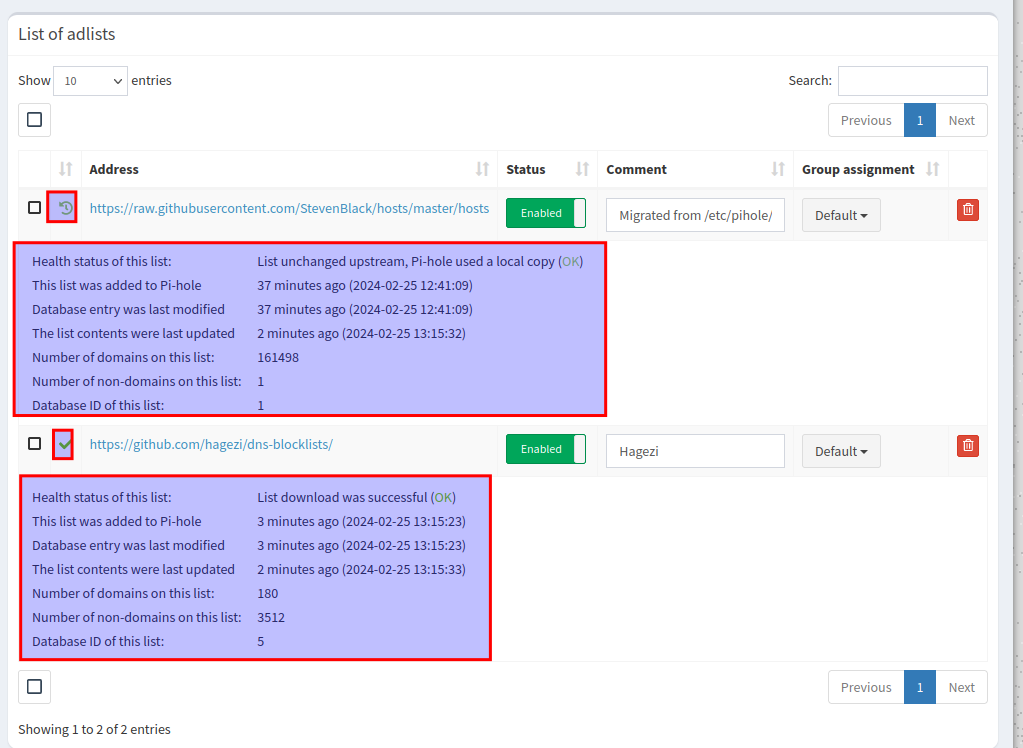
pihole -gNun gehen wir nochmal Auf Adlists und sehen dort nun das neue Domains hinzugekommen sind.
Dazu klciken wir auf die Symbol in der zweiten Spalte.
nun sehen wir die Details
DNS im DHCP-Server eintragen
Nun muss nur noch die IP vom PiHole im DHCP Server eingetragen werden.
zum beispiel in der Fritzbox oder welchen Router Ihr auch immer verwendet.
Damit nicht der DNS von der Fritzbox sondern der pi-hole übertragen wird.
So sähe das mir bei aus.
Ja mein Pi-Hole liegt in einem anderen Netz.
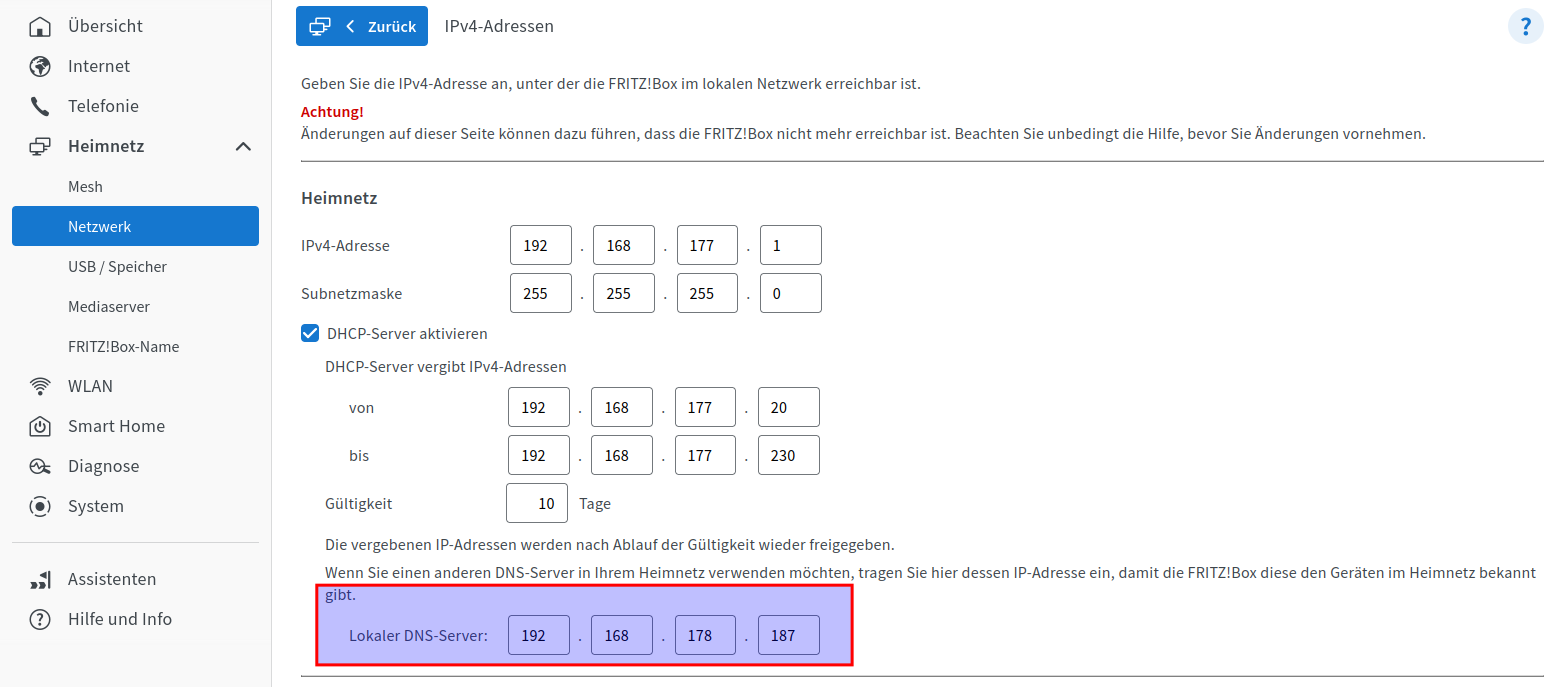
Jetzt die Clients einmal kurz trennen, damit sie den neuen DNS Server per DHCP bekommen.
Fertig.
Nun ist im Dashboard schön zu sehen, wenn webanfragen geblockt wurden.
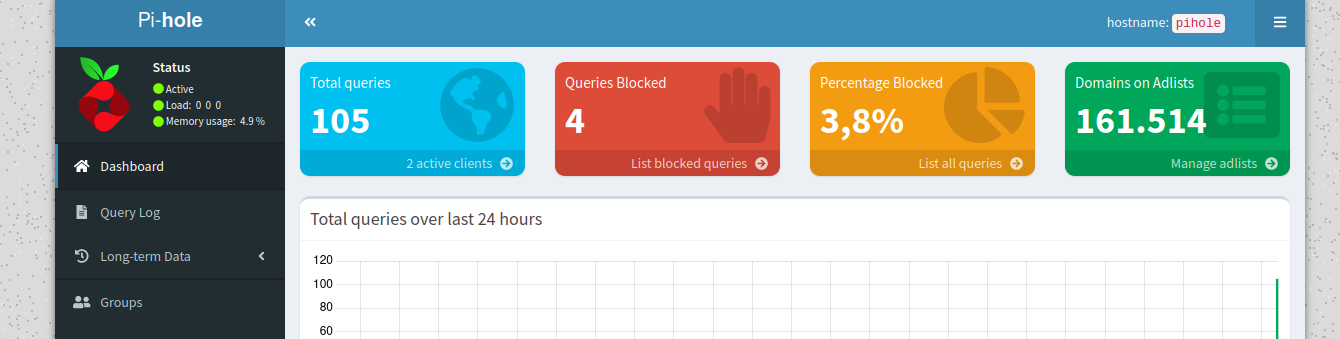
Pi-Hole Fertig Meister
piHole Kennwort vergessen
Beschreibung:
Um das Kennwort zurücksetzten falls man es vergessen aht.
geht mittels Befehl:
pihole -a -pFertig.
Firebog Listen per Ansible hinzufügen
Beschreibung:
Unter firebog.net gibt es zusätzliche Listen.
Diese einfach dem Ansible script hinzufügen, bzw. noch mehrere / andere Listen hinzufügen.
Wie immer ansible installiert haben, ne hosts.ini und mit Schlüsseldatei am Server anmelden können.
Dann abfahrt.
Das Skript
unsere hosts.ini
[all]
192.168.178.187 ansible_user=root
Das script, ich geb Ihm den namen : add_firebog_lists.yml
---
- name: Add Firebog adlists to Pi-hole
  hosts: all
  become: yes  # Required to have permissions to edit Pi-hole configuration
  tasks:
    - name: Add each adlist from The Firebog
      command: pihole -a adlist add {{ item }}
      loop:
        - 'https://url.to.first.adlist'
        - 'https://url.to.second.adlist'
        - 'https://raw.githubusercontent.com/PolishFiltersTeam/KADhosts/master/KADhosts.txt'
        - 'https://raw.githubusercontent.com/FadeMind/hosts.extras/master/add.Spam/hosts'
        - 'https://v.firebog.net/hosts/static/w3kbl.txt'
        - 'https://raw.githubusercontent.com/matomo-org/referrer-spam-blacklist/master/spammers.txt'
        - 'https://someonewhocares.org/hosts/zero/hosts'
        - 'https://raw.githubusercontent.com/VeleSila/yhosts/master/hosts'
        - 'https://winhelp2002.mvps.org/hosts.txt'
        - 'https://v.firebog.net/hosts/neohostsbasic.txt'
        - 'https://raw.githubusercontent.com/RooneyMcNibNug/pihole-stuff/master/SNAFU.txt'
        - 'https://paulgb.github.io/BarbBlock/blacklists/hosts-file.txt'
        - 'https://adaway.org/hosts.txt'
        - 'https://v.firebog.net/hosts/AdguardDNS.txt'
        - 'https://v.firebog.net/hosts/Admiral.txt'
        - 'https://raw.githubusercontent.com/anudeepND/blacklist/master/adservers.txt'
        - 'https://v.firebog.net/hosts/Easylist.txt'
        - 'https://pgl.yoyo.org/adservers/serverlist.php?hostformat=hosts&showintro=0&mimetype=plaintext'
        - 'https://raw.githubusercontent.com/FadeMind/hosts.extras/master/UncheckyAds/hosts'
        - 'https://raw.githubusercontent.com/bigdargon/hostsVN/master/hosts'
        - 'https://raw.githubusercontent.com/jdlingyu/ad-wars/master/hosts'
        - 'https://v.firebog.net/hosts/Easyprivacy.txt'
        - 'https://v.firebog.net/hosts/Prigent-Ads.txt'
        - 'https://raw.githubusercontent.com/FadeMind/hosts.extras/master/add.2o7Net/hosts'
        - 'https://raw.githubusercontent.com/crazy-max/WindowsSpyBlocker/master/data/hosts/spy.txt'
        - 'https://hostfiles.frogeye.fr/firstparty-trackers-hosts.txt'
        - 'https://www.github.developerdan.com/hosts/lists/ads-and-tracking-extended.txt'
        - 'https://raw.githubusercontent.com/Perflyst/PiHoleBlocklist/master/android-tracking.txt'
        - 'https://raw.githubusercontent.com/Perflyst/PiHoleBlocklist/master/SmartTV.txt'
        - 'https://raw.githubusercontent.com/Perflyst/PiHoleBlocklist/master/AmazonFireTV.txt'
        - 'https://gitlab.com/quidsup/notrack-blocklists/raw/master/notrack-blocklist.txt'
        - 'https://raw.githubusercontent.com/DandelionSprout/adfilt/master/Alternate%20versions%20Anti-Malware%20List/AntiMalwareHosts.txt'
        - 'https://osint.digitalside.it/Threat-Intel/lists/latestdomains.txt'
        - 'https://v.firebog.net/hosts/Prigent-Crypto.txt'
        - 'https://raw.githubusercontent.com/FadeMind/hosts.extras/master/add.Risk/hosts'
        - 'https://bitbucket.org/ethanr/dns-blacklists/raw/8575c9f96e5b4a1308f2f12394abd86d0927a4a0/bad_lists/Mandiant_APT1_Report_Appendix_D.txt'
        - 'https://phishing.army/download/phishing_army_blocklist_extended.txt'
        - 'https://gitlab.com/quidsup/notrack-blocklists/raw/master/notrack-malware.txt'
        - 'https://v.firebog.net/hosts/RPiList-Malware.txt'
        - 'https://v.firebog.net/hosts/RPiList-Phishing.txt'
        - 'https://raw.githubusercontent.com/Spam404/lists/master/main-blacklist.txt'
        - 'https://raw.githubusercontent.com/AssoEchap/stalkerware-indicators/master/generated/hosts'
        - 'https://urlhaus.abuse.ch/downloads/hostfile/'
        - 'https://malware-filter.gitlab.io/malware-filter/phishing-filter-hosts.txt'
        - 'https://v.firebog.net/hosts/Prigent-Malware.txt'
        # Füge weitere URLs hier hinzu
      register: add_adlist_output
      changed_when: "'already exists in the list' not in add_adlist_output.stdout"
    #Pihole aktualisieren
    - name: Update gravity to apply the new lists
      command: pihole -g
Nun vom Laptop / Service PC das Playbook ausführen
ansible-playbook -i hosts.ini add_firebog_lists.ymlAusgabe:
Ansible Ausgabe
duffy@duffy-convert:~/Dokumente/ansible/pi-hole$ ansible-playbook -i host.ini add_firebog_lists.yml
PLAY [Add Firebog adlists to Pi-hole] *********************************************************************************
TASK [Gathering Facts] ************************************************************************************************
ok: [192.168.178.187]
TASK [Add each adlist from The Firebog] *******************************************************************************
changed: [192.168.178.187] => (item=https://url.to.first.adlist)
changed: [192.168.178.187] => (item=https://url.to.second.adlist)
changed: [192.168.178.187] => (item=https://raw.githubusercontent.com/PolishFiltersTeam/KADhosts/master/KADhosts.txt)
changed: [192.168.178.187] => (item=https://raw.githubusercontent.com/FadeMind/hosts.extras/master/add.Spam/hosts)
changed: [192.168.178.187] => (item=https://v.firebog.net/hosts/static/w3kbl.txt)
changed: [192.168.178.187] => (item=https://raw.githubusercontent.com/matomo-org/referrer-spam-blacklist/master/spammers.txt)
changed: [192.168.178.187] => (item=https://someonewhocares.org/hosts/zero/hosts)
changed: [192.168.178.187] => (item=https://raw.githubusercontent.com/VeleSila/yhosts/master/hosts)
changed: [192.168.178.187] => (item=https://winhelp2002.mvps.org/hosts.txt)
changed: [192.168.178.187] => (item=https://v.firebog.net/hosts/neohostsbasic.txt)
changed: [192.168.178.187] => (item=https://raw.githubusercontent.com/RooneyMcNibNug/pihole-stuff/master/SNAFU.txt)
changed: [192.168.178.187] => (item=https://paulgb.github.io/BarbBlock/blacklists/hosts-file.txt)
changed: [192.168.178.187] => (item=https://adaway.org/hosts.txt)
changed: [192.168.178.187] => (item=https://v.firebog.net/hosts/AdguardDNS.txt)
changed: [192.168.178.187] => (item=https://v.firebog.net/hosts/Admiral.txt)
changed: [192.168.178.187] => (item=https://raw.githubusercontent.com/anudeepND/blacklist/master/adservers.txt)
changed: [192.168.178.187] => (item=https://v.firebog.net/hosts/Easylist.txt)
changed: [192.168.178.187] => (item=https://pgl.yoyo.org/adservers/serverlist.php?hostformat=hosts&showintro=0&mimetype=plaintext)
changed: [192.168.178.187] => (item=https://raw.githubusercontent.com/FadeMind/hosts.extras/master/UncheckyAds/hosts)
changed: [192.168.178.187] => (item=https://raw.githubusercontent.com/bigdargon/hostsVN/master/hosts)
changed: [192.168.178.187] => (item=https://raw.githubusercontent.com/jdlingyu/ad-wars/master/hosts)
changed: [192.168.178.187] => (item=https://v.firebog.net/hosts/Easyprivacy.txt)
changed: [192.168.178.187] => (item=https://v.firebog.net/hosts/Prigent-Ads.txt)
changed: [192.168.178.187] => (item=https://raw.githubusercontent.com/FadeMind/hosts.extras/master/add.2o7Net/hosts)
changed: [192.168.178.187] => (item=https://raw.githubusercontent.com/crazy-max/WindowsSpyBlocker/master/data/hosts/spy.txt)
changed: [192.168.178.187] => (item=https://hostfiles.frogeye.fr/firstparty-trackers-hosts.txt)
changed: [192.168.178.187] => (item=https://www.github.developerdan.com/hosts/lists/ads-and-tracking-extended.txt)
changed: [192.168.178.187] => (item=https://raw.githubusercontent.com/Perflyst/PiHoleBlocklist/master/android-tracking.txt)
changed: [192.168.178.187] => (item=https://raw.githubusercontent.com/Perflyst/PiHoleBlocklist/master/SmartTV.txt)
changed: [192.168.178.187] => (item=https://raw.githubusercontent.com/Perflyst/PiHoleBlocklist/master/AmazonFireTV.txt)
changed: [192.168.178.187] => (item=https://gitlab.com/quidsup/notrack-blocklists/raw/master/notrack-blocklist.txt)
changed: [192.168.178.187] => (item=https://raw.githubusercontent.com/DandelionSprout/adfilt/master/Alternate%20versions%20Anti-Malware%20List/AntiMalwareHosts.txt)
changed: [192.168.178.187] => (item=https://osint.digitalside.it/Threat-Intel/lists/latestdomains.txt)
changed: [192.168.178.187] => (item=https://v.firebog.net/hosts/Prigent-Crypto.txt)
changed: [192.168.178.187] => (item=https://raw.githubusercontent.com/FadeMind/hosts.extras/master/add.Risk/hosts)
changed: [192.168.178.187] => (item=https://bitbucket.org/ethanr/dns-blacklists/raw/8575c9f96e5b4a1308f2f12394abd86d0927a4a0/bad_lists/Mandiant_APT1_Report_Appendix_D.txt)
changed: [192.168.178.187] => (item=https://phishing.army/download/phishing_army_blocklist_extended.txt)
changed: [192.168.178.187] => (item=https://gitlab.com/quidsup/notrack-blocklists/raw/master/notrack-malware.txt)
changed: [192.168.178.187] => (item=https://v.firebog.net/hosts/RPiList-Malware.txt)
changed: [192.168.178.187] => (item=https://v.firebog.net/hosts/RPiList-Phishing.txt)
changed: [192.168.178.187] => (item=https://raw.githubusercontent.com/Spam404/lists/master/main-blacklist.txt)
changed: [192.168.178.187] => (item=https://raw.githubusercontent.com/AssoEchap/stalkerware-indicators/master/generated/hosts)
changed: [192.168.178.187] => (item=https://urlhaus.abuse.ch/downloads/hostfile/)
changed: [192.168.178.187] => (item=https://malware-filter.gitlab.io/malware-filter/phishing-filter-hosts.txt)
changed: [192.168.178.187] => (item=https://v.firebog.net/hosts/Prigent-Malware.txt)
TASK [Update gravity to apply the new lists] **************************************************************************
changed: [192.168.178.187]
PLAY RECAP ************************************************************************************************************
192.168.178.187 : ok=3 changed=2 unreachable=0 failed=0 skipped=0 rescued=0 ignored=0
Und nun in der Adlist
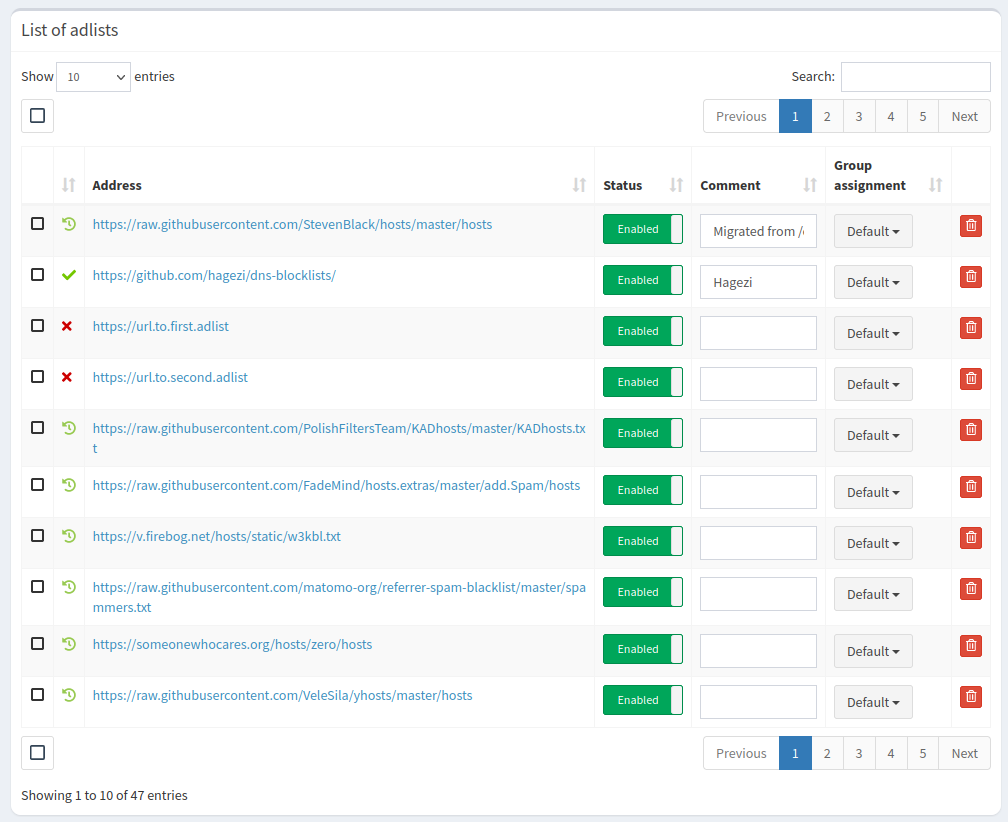
Das Dashboard
