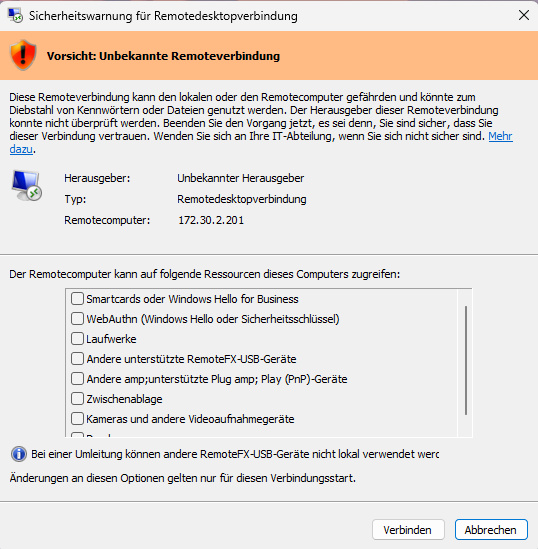
# Windows Remotedesktop/Terminalserver Unbekannte Remotedesktop Warnung

Beschreibung:

[![grafik.png](https://wiki.hacker-net.de/uploads/images/gallery/2026-06/scaled-1680-/q0menoV9Q5xkLNmi-grafik.png)](https://wiki.hacker-net.de/uploads/images/gallery/2026-06/q0menoV9Q5xkLNmi-grafik.png)
Lösung:

<div aria-level="3" class="otQkpb" data-animation-nesting="" data-copy-service-computed-style="font-family: Google Sans, Arial, sans-serif; font-size: 20px; font-weight: 600; margin: 24px 0px 12px; text-decoration: none; border-bottom: 0px rgb(0, 29, 53);" data-sfc-cb="" data-sfc-cp="" data-sfc-root="c" id="bkmrk-methode-1%3A-registry-" jsaction="" jscontroller="a7qCn#ZxCkTb" jsuid="wI6BYe_p" role="heading" style="font-family: Google Sans, Arial, sans-serif; font-size: 20px; font-weight: 600; margin: 24px 0px 12px; text-decoration: none; border-bottom: 0px rgb(0, 29, 53);">Methode 1: Registry-Anpassung (Einfachste Lösung für lokale PCs)</div><div class="" data-bfc="" data-copy-service-computed-style="font-family: Google Sans, Arial, sans-serif; font-size: 16px; font-weight: 400; margin: 0px; text-decoration: none; border-bottom: 0px rgb(10, 10, 10);" data-ved="2ahUKEwj5g7TNlYKVAxW1wbsIHRSlEiIQi4wTegoIAggACAAICRAA" id="bkmrk-diese-methode-schalt" style="font-family: Google Sans, Arial, sans-serif; font-size: 16px; font-weight: 400; margin: 0px; text-decoration: none; border-bottom: 0px rgb(10, 10, 10);"><div class="n6owBd awi2gc" data-copy-service-computed-style="font-family: Google Sans, Arial, sans-serif; font-size: 16px; font-weight: 400; margin: 12px 0px 16px; text-decoration: none; border-bottom: 0px rgb(10, 10, 10);" data-hveid="CAIIAAgACAkQAQ" data-sfc-cb="" data-sfc-cp="" data-sfc-root="c" jsaction="" jscontroller="TDBkbc#Ml18Xb" jsuid="wI6BYe_u" style="font-family: Google Sans, Arial, sans-serif; font-size: 16px; font-weight: 400; margin: 12px 0px 16px; text-decoration: none; border-bottom: 0px rgb(10, 10, 10);">Diese Methode schaltet die Warnmeldung systemweit ab, ignoriert aber bei zukünftigen Verbindungen den Warnhinweis.</div></div><div class="" data-bfc="" data-copy-service-computed-style="font-family: Google Sans, Arial, sans-serif; font-size: 16px; font-weight: 400; margin: 0px; text-decoration: none; border-bottom: 0px rgb(10, 10, 10);" data-ved="2ahUKEwj5g7TNlYKVAxW1wbsIHRSlEiIQi4wTegoIAggACAAIChAA" id="bkmrk-dr%C3%BCcken-sie-win-%2B-r%2C" style="font-family: Google Sans, Arial, sans-serif; font-size: 16px; font-weight: 400; margin: 0px; text-decoration: none; border-bottom: 0px rgb(10, 10, 10);">1. <span class="T286Pc" data-copy-service-computed-style="font-family: Google Sans, Arial, sans-serif; font-size: 16px; font-weight: 400; margin: 0px; text-decoration: none; border-bottom: 0px rgb(10, 10, 10);" data-sfc-cb="" data-sfc-cp="" data-sfc-root="c" style="font-family: Google Sans, Arial, sans-serif; font-size: 16px; font-weight: 400; margin: 0px; text-decoration: none; border-bottom: 0px rgb(10, 10, 10);">Drücken Sie `Win + R`, geben Sie `regedit` ein und bestätigen Sie mit Enter.</span>
2. <span class="T286Pc" data-copy-service-computed-style="font-family: Google Sans, Arial, sans-serif; font-size: 16px; font-weight: 400; margin: 0px; text-decoration: none; border-bottom: 0px rgb(10, 10, 10);" data-sfc-cb="" data-sfc-cp="" data-sfc-root="c" style="font-family: Google Sans, Arial, sans-serif; font-size: 16px; font-weight: 400; margin: 0px; text-decoration: none; border-bottom: 0px rgb(10, 10, 10);">Navigieren Sie zu diesem Pfad:  
    `HKEY_LOCAL_MACHINE\Software\Policies\Microsoft\Windows NT\Terminal Services\Client`</span>
3. <span class="T286Pc" data-copy-service-computed-style="font-family: Google Sans, Arial, sans-serif; font-size: 16px; font-weight: 400; margin: 0px; text-decoration: none; border-bottom: 0px rgb(10, 10, 10);" data-sfc-cb="" data-sfc-cp="" data-sfc-root="c" style="font-family: Google Sans, Arial, sans-serif; font-size: 16px; font-weight: 400; margin: 0px; text-decoration: none; border-bottom: 0px rgb(10, 10, 10);">Klicken Sie mit der rechten Maustaste in den rechten Bereich und erstellen Sie einen **Neuen DWORD-Wert (32-Bit)**.</span>
4. <span class="T286Pc" data-copy-service-computed-style="font-family: Google Sans, Arial, sans-serif; font-size: 16px; font-weight: 400; margin: 0px; text-decoration: none; border-bottom: 0px rgb(10, 10, 10);" data-sfc-cb="" data-sfc-cp="" data-sfc-root="c" style="font-family: Google Sans, Arial, sans-serif; font-size: 16px; font-weight: 400; margin: 0px; text-decoration: none; border-bottom: 0px rgb(10, 10, 10);">Benennen Sie diesen exakt: `RedirectionWarningDialogVersion`</span>
5. <span class="T286Pc" data-copy-service-computed-style="font-family: Google Sans, Arial, sans-serif; font-size: 16px; font-weight: 400; margin: 0px; text-decoration: none; border-bottom: 0px rgb(10, 10, 10);" data-sfc-cb="" data-sfc-cp="" data-sfc-root="c" style="font-family: Google Sans, Arial, sans-serif; font-size: 16px; font-weight: 400; margin: 0px; text-decoration: none; border-bottom: 0px rgb(10, 10, 10);">Doppelklicken Sie auf den neuen Wert und setzen Sie die **Basis auf Hexadezimal** sowie den **Wert auf 1**.</span>
6. <span class="T286Pc" data-copy-service-computed-style="font-family: Google Sans, Arial, sans-serif; font-size: 16px; font-weight: 400; margin: 0px; text-decoration: none; border-bottom: 0px rgb(10, 10, 10);" data-sfc-cb="" data-sfc-cp="" data-sfc-root="c" style="font-family: Google Sans, Arial, sans-serif; font-size: 16px; font-weight: 400; margin: 0px; text-decoration: none; border-bottom: 0px rgb(10, 10, 10);">Starten Sie Ihren PC neu, um die Änderungen zu übernehm</span>en.

</div>Oder [RedirectionWarningDialogVersion.reg](https://wiki.hacker-net.de/attachments/134) REG Datei importieren, das selbe in Grün.