
DFPlayer Mini SKU Platine
Beschreibung
Eine Platine zum Anschluss von Lautsprecher und abspielen von MP3s.
Eine Komplette c Library zum steuern der Platine.
Spezifikation
- supported sampling rates (kHz): 8/11.025/12/16/22.05/24/32/44.1/48
- 24 -bit DAC output, support for dynamic range 90dB , SNR support 85dB
- fully supports FAT16 , FAT32 file system, maximum support 32G of the TF card, support 32G of U disk, 64M bytes NORFLASH
- a variety of control modes, I/O control mode, serial mode, AD button control mode
- advertising sound waiting function, the music can be suspended. when advertising is over in the music continue to play
- audio data sorted by folder, supports up to 100 folders, every folder can hold up to 255 songs
- 30 level adjustable volume, 6 -level EQ adjustable
Betriebsmodus
1. Serial Mode
Hier wird im Serial Baudmode ein hexstring übergeben in fogendem Format
Support for asynchronous serial communication mode via PC serial sending commands Communication Standard:9600 bps Data bits :1 Checkout :none Flow Control :none
- Instruction Description

Es gibt zwei Modi einmal sende und Empfangen.
Über senden werden Commandos wie Pla Pause etc. gesendet und über empfangen des Status. Wie läuft die MP3 oder den text der Datei.
- Serial Control Cmd
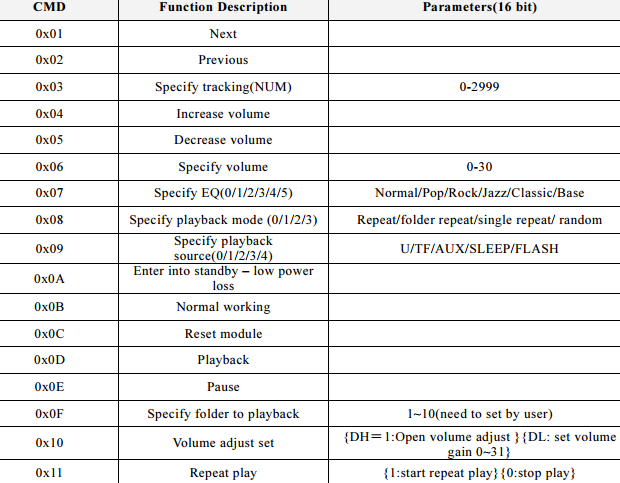
Serial Query Cmd

Modi 2, Taster mit Transistoren.
Es gibt auch die Möglichkeit ohne Software das Modul zu betreiben, dort werden die Schalter durch Widerstandswerte dargestellst.
- Refer diagram


Modi 3. I/O Mode, der Simpleste Modus, ohne Transitoren und Software
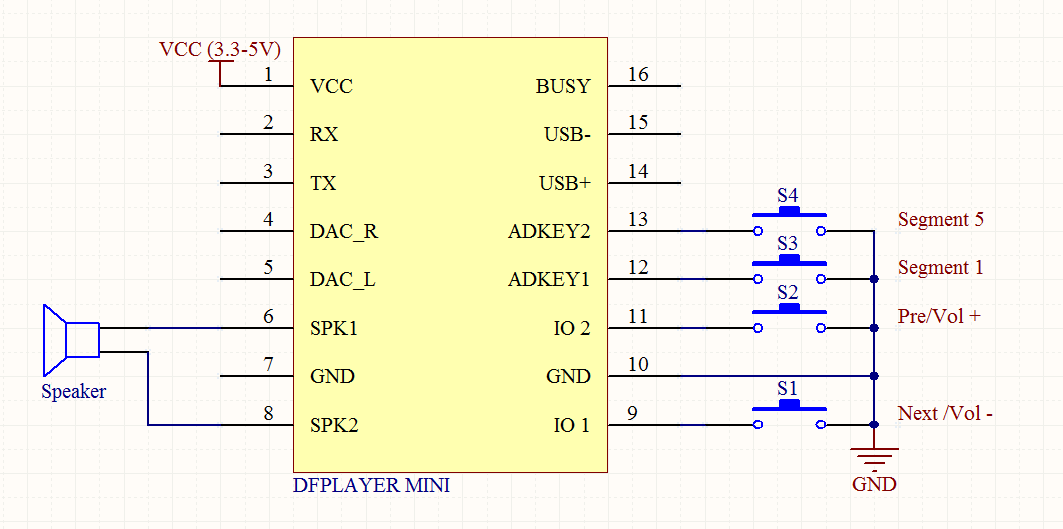
Wenn kurz gedrückt wird ist forwärt / rückwärts, wird gedrückt geahlten ist Lauter / Leiser.
Arduinio Anschluss

Software Arduino
Die Software Libray kann unter https://github.com/DFRobot/DFRobotDFPlayerMini/ bezogen werden.
Zur Zeit der Erstllung des Artikels war das die Version von 2018, der Artikel wurde 2022 erstellt. Die Version 1.0.5 .
Damit ist es warscheinlich das es keine neuen Versionen geben wird, da alles funktioniert. Dieser Download ist auch dem Artikel hier angeheftet. Aber es schadet trotzdem nicht zu schauen obs eine neue Version gibt.
Benutzung
Archiv Entpacken und dem Projekt hinzufügen.
Dann noch SoftwareSerial hinzufügen.
Am einfachsten dur PIO-Home und dann library
Beispiel Code:
#include <Arduino.h>
#include "SoftwareSerial.h"
#include "DFRobotDFPlayerMini.h"


SoftwareSerial mySoftwareSerial(10, 11); // RX, TX
DFRobotDFPlayerMini myDFPlayer;
void printDetail(uint8_t type, int value);

void setup() {
  // put your setup code here, to run once:
  mySoftwareSerial.begin(9600);
  Serial.begin(115200);

  Serial.println();
  Serial.println(F("DFRobot DFPlayer Mini Demo"));
  Serial.println(F("Initializing DFPlayer ... (May take 3~5 seconds)"));

  if (!myDFPlayer.begin(mySoftwareSerial)) {  //Use softwareSerial to communicate with mp3.
    Serial.println(F("Unable to begin:"));
    Serial.println(F("1.Please recheck the connection!"));
    Serial.println(F("2.Please insert the SD card!"));
    while(true);
  }
  Serial.println(F("DFPlayer Mini online."));

  myDFPlayer.setTimeOut(500); //Set serial communictaion time out 500ms

  //----Set volume----
  myDFPlayer.volume(25);  //Set volume value (0~30).
  myDFPlayer.volumeUp(); //Volume Up
  myDFPlayer.volumeDown(); //Volume Down

  //----Set different EQ----
  myDFPlayer.EQ(DFPLAYER_EQ_NORMAL);
//  myDFPlayer.EQ(DFPLAYER_EQ_POP);
//  myDFPlayer.EQ(DFPLAYER_EQ_ROCK);
//  myDFPlayer.EQ(DFPLAYER_EQ_JAZZ);
//  myDFPlayer.EQ(DFPLAYER_EQ_CLASSIC);
//  myDFPlayer.EQ(DFPLAYER_EQ_BASS);

  //----Set device we use SD as default----
//  myDFPlayer.outputDevice(DFPLAYER_DEVICE_U_DISK);
  myDFPlayer.outputDevice(DFPLAYER_DEVICE_SD);
//  myDFPlayer.outputDevice(DFPLAYER_DEVICE_AUX);
//  myDFPlayer.outputDevice(DFPLAYER_DEVICE_SLEEP);
//  myDFPlayer.outputDevice(DFPLAYER_DEVICE_FLASH);

  //----Mp3 control----
//  myDFPlayer.sleep();     //sleep
//  myDFPlayer.reset();     //Reset the module
//  myDFPlayer.enableDAC();  //Enable On-chip DAC
//  myDFPlayer.disableDAC();  //Disable On-chip DAC
//  myDFPlayer.outputSetting(true, 15); //output setting, enable the output and set the gain to 15
  myDFPlayer.play(1);  //Play the first mp3
  /*----Mp3 play----
  myDFPlayer.next();  //Play next mp3
  delay(1000);
  myDFPlayer.previous();  //Play previous mp3
  delay(1000);
  myDFPlayer.play(1);  //Play the first mp3
  delay(1000);
  myDFPlayer.loop(1);  //Loop the first mp3
  delay(1000);
  myDFPlayer.pause();  //pause the mp3
  delay(1000);
  myDFPlayer.start();  //start the mp3 from the pause
  delay(1000);
  myDFPlayer.playFolder(15, 4);  //play specific mp3 in SD:/15/004.mp3; Folder Name(1~99); File Name(1~255)
  delay(1000);
  myDFPlayer.enableLoopAll(); //loop all mp3 files.
  delay(1000);
  myDFPlayer.disableLoopAll(); //stop loop all mp3 files.
  delay(1000);
  myDFPlayer.playMp3Folder(4); //play specific mp3 in SD:/MP3/0004.mp3; File Name(0~65535)
  delay(1000);
  myDFPlayer.advertise(3); //advertise specific mp3 in SD:/ADVERT/0003.mp3; File Name(0~65535)
  delay(1000);
  myDFPlayer.stopAdvertise(); //stop advertise
  delay(1000);
  myDFPlayer.playLargeFolder(2, 999); //play specific mp3 in SD:/02/004.mp3; Folder Name(1~10); File Name(1~1000)
  delay(1000);
  myDFPlayer.loopFolder(5); //loop all mp3 files in folder SD:/05.
  delay(1000);
  myDFPlayer.randomAll(); //Random play all the mp3.
  delay(1000);
  myDFPlayer.enableLoop(); //enable loop.
  delay(1000);
  myDFPlayer.disableLoop(); //disable loop.
  delay(1000);
  */

  //----Read imformation----
  Serial.println(myDFPlayer.readState()); //read mp3 state
  Serial.println(myDFPlayer.readVolume()); //read current volume
  Serial.println(myDFPlayer.readEQ()); //read EQ setting
  Serial.println(myDFPlayer.readFileCounts()); //read all file counts in SD card
  Serial.println(myDFPlayer.readCurrentFileNumber()); //read current play file number
  Serial.println(myDFPlayer.readFileCountsInFolder(3)); //read file counts in folder SD:/03
}

void loop() {
  // put your main code here, to run repeatedly:
   static unsigned long timer = millis();

  //if (millis() - timer > 3000) {
   // timer = millis();
    //myDFPlayer.next();  //Play next mp3 every 3 second.
  //}
 //  myDFPlayer.play(1);
   if (myDFPlayer.available()) {
    printDetail(myDFPlayer.readType(), myDFPlayer.read()); //Print the detail message from DFPlayer to handle different errors and states.
  }

}

void printDetail(uint8_t type, int value){
  switch (type) {
    case TimeOut:
      Serial.println(F("Time Out!"));
      break;
    case WrongStack:
      Serial.println(F("Stack Wrong!"));
      break;
    case DFPlayerCardInserted:
      Serial.println(F("Card Inserted!"));
      break;
    case DFPlayerCardRemoved:
      Serial.println(F("Card Removed!"));
      break;
    case DFPlayerCardOnline:
      Serial.println(F("Card Online!"));
      break;
    case DFPlayerUSBInserted:
      Serial.println("USB Inserted!");
      break;
    case DFPlayerUSBRemoved:
      Serial.println("USB Removed!");
      break;
    case DFPlayerPlayFinished:
      Serial.print(F("Number:"));
      Serial.print(value);
      Serial.println(F(" Play Finished!"));
      break;
    case DFPlayerError:
      Serial.print(F("DFPlayerError:"));
      switch (value) {
        case Busy:
          Serial.println(F("Card not found"));
          break;
        case Sleeping:
          Serial.println(F("Sleeping"));
          break;
        case SerialWrongStack:
          Serial.println(F("Get Wrong Stack"));
          break;
        case CheckSumNotMatch:
          Serial.println(F("Check Sum Not Match"));
          break;
        case FileIndexOut:
          Serial.println(F("File Index Out of Bound"));
          break;
        case FileMismatch:
          Serial.println(F("Cannot Find File"));
          break;
        case Advertise:
          Serial.println(F("In Advertise"));
          break;
        default:
          break;
      }
      break;
    default:
      break;
  }

}