
Alle Daten vom Video via OSD anzeigen
Beschreibung:
Alle Daten vom Video via OSD anzeigen.
Plugin LUA Script:
Als osd-techinfo.lua speichern.
-- osd-techinfo.lua
-- Zeigt beim Laden einer Datei automatisch technische Infos als OSD (mpv/Celluloid)

local mp = require 'mp'

-- ===== Optionen (per script-opts überschreibbar) =====
local opts = {
    show_secs = 5,          -- Wie lange das OSD angezeigt wird
    autoupdate = false,     -- Wenn true: aktualisiert sich während der Wiedergabe
    autoupdate_interval = 1 -- Sekundentakt fürs Autoupdate
}
(require 'mp.options').read_options(opts, "osd-techinfo")

local timer = nil

local function fmt_bytes(n)
    if not n then return "n/a" end
    local u = {"B","KiB","MiB","GiB","TiB"}
    local i = 1
    while n >= 1024 and i < #u do n = n/1024; i = i + 1 end
    return string.format("%.2f %s", n, u[i])
end

local function fmt_bitrate(bits_per_sec)
    if not bits_per_sec or bits_per_sec <= 0 then return "n/a" end
    if bits_per_sec >= 1e6 then
        return string.format("%.2f Mbps", bits_per_sec / 1e6)
    else
        return string.format("%.0f kbps", bits_per_sec / 1e3)
    end
end

local function safe(prop, default)
    local v = mp.get_property_native(prop)
    if v == nil or v == "" then return default or "n/a" end
    return v
end

local function techinfo()
    -- Basis
    local filename   = safe("filename")
    local demuxer    = safe("file-format")
    local duration   = mp.get_property_native("duration")
    local file_size  = mp.get_property_native("file-size")
    local hwdec      = safe("hwdec-current", "off")
    local pos        = mp.get_property_native("time-pos") or 0

    -- Gesamtbitrate ≈ Dateigröße / Dauer
    local total_bps = nil
    if duration and duration > 0 and file_size and file_size > 0 then
        total_bps = (file_size * 8) / duration
    end

    -- Video
    local vcodec     = safe("video-codec")
    local vparams    = mp.get_property_native("video-params") or {}
    local vw         = vparams.w or mp.get_property_native("width")
    local vh         = vparams.h or mp.get_property_native("height")
    local vfps       = mp.get_property_native("fps")
    local vpixfmt    = vparams.pixelformat or vparams.pix_fmt or "n/a"
    local vbitrate   = mp.get_property_native("video-bitrate")

    -- Audio
    local acodec     = safe("audio-codec")
    local aparams    = mp.get_property_native("audio-params") or {}
    local asr        = aparams.samplerate or mp.get_property_native("audio-params/samplerate")
    local ach        = aparams.channels or mp.get_property_native("audio-params/channels")
    local abitrate   = mp.get_property_native("audio-bitrate")
    local aformat    = aparams.format or "n/a"

    -- Subs
    local sid        = mp.get_property_native("sid")
    local sparams    = mp.get_property_native("sub-params") or {}
    local scodec     = sparams.codec or (sid and "present" or "none")

    local lines = {}
    table.insert(lines, string.format("📄 %s", filename))
    table.insert(lines, string.format("🧰 Container: %s   HWDec: %s", demuxer, hwdec))
    if duration then
        table.insert(lines, string.format("⏱ Dauer: %s   Position: %s",
            mp.format_time(duration), mp.format_time(pos)))
    end
    if file_size then
        table.insert(lines, string.format("💾 Größe: %s   ∑ Bitrate: %s",
            fmt_bytes(file_size), fmt_bitrate(total_bps)))
    end

    table.insert(lines, "")
    table.insert(lines, "🎬 Video")
    table.insert(lines, string.format("   Codec: %s   %sx%s   FPS: %s",
        vcodec, tostring(vw or "n/a"), tostring(vh or "n/a"), tostring(vfps or "n/a")))
    table.insert(lines, string.format("   PixFmt: %s   Bitrate: %s",
        tostring(vpixfmt), fmt_bitrate(vbitrate)))

    table.insert(lines, "")
    table.insert(lines, "🔊 Audio")
    table.insert(lines, string.format("   Codec: %s   %s Hz   Kanäle: %s",
        acodec, tostring(asr or "n/a"), tostring(ach or "n/a")))
    table.insert(lines, string.format("   SampleFmt: %s   Bitrate: %s",
        tostring(aformat), fmt_bitrate(abitrate)))

    table.insert(lines, "")
    table.insert(lines, "💬 Untertitel")
    table.insert(lines, string.format("   SID: %s   Codec: %s",
        tostring(sid or "none"), tostring(scodec or "n/a")))

    return table.concat(lines, "\n")
end

local function show_once()
    mp.osd_message(techinfo(), opts.show_secs)
end

local function start_autoupdate()
    if not opts.autoupdate then
        show_once()
        return
    end
    if timer then timer:kill() end
    timer = mp.add_periodic_timer(math.max(0.2, opts.autoupdate_interval), function()
        mp.osd_message(techinfo(), opts.autoupdate_interval + 0.1)
    end)
end

mp.register_event("file-loaded", start_autoupdate)
mp.register_event("end-file", function()
    if timer then timer:kill(); timer = nil end
end)
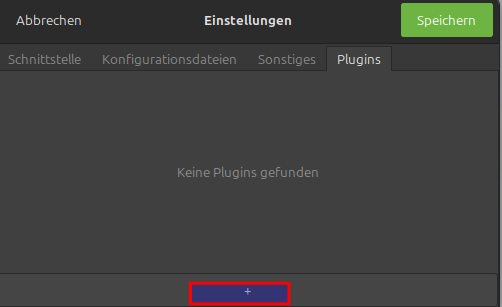
Dann unter Einstellungen -> Register Plugins auf das + für hinzufügen klicken.
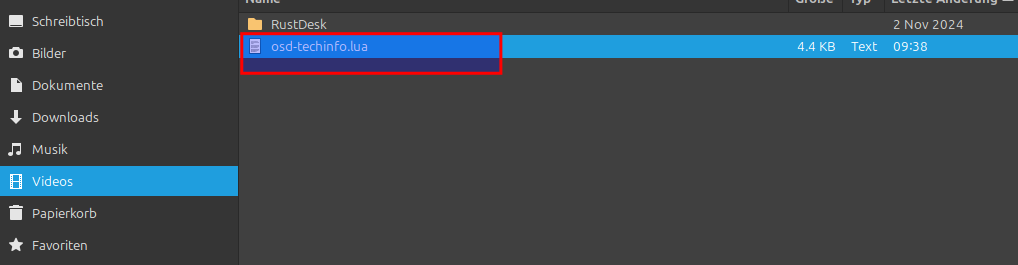
Nun das Script auswählen
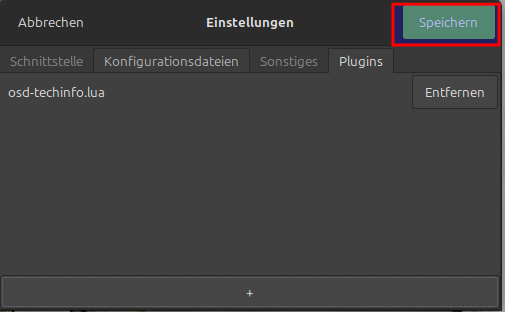
Auf speichern klicken, jetzt startet der Player neu.
Nun ist das Script aktiv.
Jetzt noch einen Hotkey vergeben
Nun im Verzeichnis folgende Datei anlegen
Wo ablegen?
-
Celluloid (Flatpak):
~/.var/app/io.github.celluloid_player.Celluloid/config/input.conf~/.var/app/io.github.celluloid_player.Celluloid/config/scripts/osd-techinfo.lua -
Celluloid (normal/Repo) bzw. reines mpv:
~/.config/celluloid/input.conf~/.config/celluloid/scripts/osd-techinfo.lua
nano /home/duffy/.config/celluloid/input.conf
Inhalt
Ctrl+i script-message osd_techinfoDann den Player neustarten und mit strg + i aufrufen