Hibernate / Ruhezustand hinzufügen
Beschreibung:
Bei Linux Mint kann es vorkommen das beim Herunterfahren der Button Ruhezustand / Hibernate fehlt.
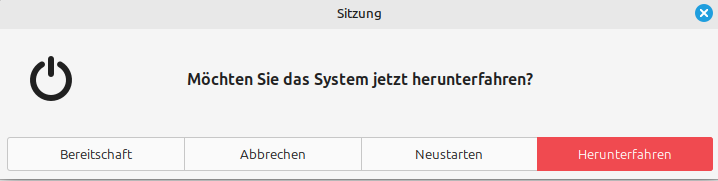
DIese kann man nachrüsten, wenn das System hibernate unterstützt.
Ob das System hibernate unterstützt und auch aus diesem wieder aufwacht kann man mit diesem Befehl testen.
Damit versetzt man das System in den hibernate
sudo systemctl hibernateWenn das geklappt hat, gibts zwei möglichkeiten.
- Man erstellt sich eine Verknüpfung mit dem Befehl
- Wir fügen den Button zum Beenden Menü hinzu
Hinzufügen zum Menü:
Mittels sh Script, was eine SWAP Datei für Hibernate angelegt, danach wird der Menüeintrag erstellt.
Dieses Script läuft ab Linux mint 22
nano setup_hibernate.shInhalt:
#!/bin/bash

# Script to setup hibernation in Linux Mint 22
# Author: Random Person
# Data: 2024-08-12
# Based on: https://ubuntuhandbook.org/index.php/2021/08/enable-hibernate-ubuntu-21-10

# Print text inside a boxed border.
box_title() {
    local len=$((${#1}+2))

    printf "\n╔"
    printf -- "═%.0s" $(seq 1 $len)
    printf "╗\n║ $1 ║\n╚"
    printf -- "═%.0s" $(seq 1 $len)
    printf "╝\n\n"
}

# Setup swap file
setup_swap() {
    echo
    echo "Setting up the swap file."
    echo "Please wait..."
    echo

    swapoff -a
    rm -f /swapfile
    dd if=/dev/zero of=/swapfile bs=1M count=$needed
    chmod 0600 /swapfile
    mkswap /swapfile
    sed -i '/swap/{s/^/#/}' /etc/fstab
    tee -a /etc/fstab <<< "/swapfile  none  swap  sw 0  0"
    swapon -a
}

# Setup Hibernate
setup_hibernate() {
    local resume_params="resume=UUID=$(findmnt / -o UUID -n) resume_offset=$(filefrag -v /swapfile|awk 'NR==4{gsub(/\./,"");print $4;}') "

    echo
    echo "Setting up hibernation."
    echo "Please wait..."
    echo

    # Adds kernel parameter in grub boot configuration file
    if grep resume /etc/default/grub>/dev/null; then
        sed -i "s/GRUB_CMDLINE_LINUX_DEFAULT=\".*resume_offset=[0-9]* /GRUB_CMDLINE_LINUX_DEFAULT=\"$resume_params/" /etc/default/grub
    else
        sed -i "s/GRUB_CMDLINE_LINUX_DEFAULT=\"/GRUB_CMDLINE_LINUX_DEFAULT=\"$resume_params/" /etc/default/grub
    fi
    update-grub

    # Adds device major:minor numbers in resume configuration
    echo $(findmnt / -o MAJ:MIN -n) > /sys/power/resume
    echo "#    Path                   Mode UID  GID  Age Argument" > /etc/tmpfiles.d/hibernation_resume.conf
    echo "w    /sys/power/resume       -    -    -    -   $(findmnt / -o MAJ:MIN -n)" >> /etc/tmpfiles.d/hibernation_resume.conf

    # Adds hibernation option in power-off menu
    apt install -y -qq polkitd-pkla

    mkdir -p /etc/polkit-1/localauthority/50-local.d
    tee /etc/polkit-1/localauthority/50-local.d/com.ubuntu.enable-hibernate.pkla << 'EOB' >/dev/null
[Re-enable hibernate by default in upower]
Identity=unix-user:*
Action=org.freedesktop.upower.hibernate
ResultActive=yes

[Re-enable hibernate by default in logind]
Identity=unix-user:*
Action=org.freedesktop.login1.hibernate;org.freedesktop.login1.handle-hibernate-key;org.freedesktop.login1;org.freedesktop.login1.hibernate-multiple-sessions;org.freedesktop.login1.hibernate-ignore-inhibit
ResultActive=yes
EOB

    mkdir -p /etc/polkit-1/localauthority/90-mandatory.d
    tee /etc/polkit-1/localauthority/90-mandatory.d/enable-hibernate.pkla << 'EOB' >/dev/null
[Enable hibernate]
Identity=unix-user:*
Action=org.freedesktop.login1.hibernate;org.freedesktop.login1.handle-hibernate-key;org.freedesktop.login1;org.freedesktop.login1.hibernate-multiple-sessions
ResultActive=yes
EOB

    mkdir -p /etc/polkit-1/rules.d
    tee /etc/polkit-1/rules.d/10-enable-hibernate.rules << 'EOB' >/dev/null
polkit.addRule(function(action, subject) {
    if (action.id == \"org.freedesktop.login1.hibernate\" ||
        action.id == \"org.freedesktop.login1.hibernate-multiple-sessions\" ||
        action.id == \"org.freedesktop.upower.hibernate\" ||
        action.id == \"org.freedesktop.login1.handle-hibernate-key\" ||
        action.id == \"org.freedesktop.login1.hibernate-ignore-inhibit\")
    {
        return polkit.Result.YES;
    }
});
EOB

    echo
    echo "Hibernation setup completed."
    echo "Please reboot your system for all changes to take effect."
    echo
}

main() {
    local available=$(df -m / | tail -n1 | awk '{print $4}')
    local swap=$(free -m | tail -n1 | awk '{print $2}')
    local needed=$(($1 * 1024))

    box_title "Setup Hibernate"

    if [[ ! `id -u` -eq "0" ]] || [[ "$#" != "1" ]] || ! [[ $1 =~ ^[0-9]+$ ]]; then
        echo
        echo "Use: sudo bash setup-hibernate.sh [SIZE]"
        echo "[SIZE] => Swap size in GB."
        echo
    else
        # Check required swap file size
        available=$(($available + $swap))
        if [ "$available" -gt "$needed" ]; then
            setup_swap
            setup_hibernate
        else
            echo
            echo "Hibernate setup aborted."
            echo "Available swap space: $available"
            echo "Needed swap space: $needed"
            echo
        fi
    fi
}

main "$@"
Nun ausführbar machen und ausführen, die Größe der SWAP Partition für Hibernate
chmod +x setup_hibernate.sh
sudo ./setup_hibernate.sh [SIZE]
Output:
...
Found initrd image: /boot/initrd.img-6.8.0-51-generic
Found linux image: /boot/vmlinuz-6.8.0-50-generic
Found initrd image: /boot/initrd.img-6.8.0-50-generic
Found linux image: /boot/vmlinuz-5.15.0-56-generic
Found initrd image: /boot/initrd.img-5.15.0-56-generic
Warning: os-prober will be executed to detect other bootable partitions.
Its output will be used to detect bootable binaries on them and create new boot entries.
Adding boot menu entry for UEFI Firmware Settings ...
done
Die folgenden NEUEN Pakete werden installiert:
  polkitd-pkla
0 aktualisiert, 1 neu installiert, 0 zu entfernen und 9 nicht aktualisiert.
Es müssen 24,2 kB an Archiven heruntergeladen werden.
Nach dieser Operation werden 121 kB Plattenplatz zusätzlich benutzt.
Vormals nicht ausgewähltes Paket polkitd-pkla wird gewählt.
(Lese Datenbank ... 763234 Dateien und Verzeichnisse sind derzeit installiert.)
Vorbereitung zum Entpacken von .../polkitd-pkla_124-2ubuntu1_amd64.deb ...
Entpacken von polkitd-pkla (124-2ubuntu1) ...
polkitd-pkla (124-2ubuntu1) wird eingerichtet ...
Trigger für man-db (2.12.0-4build2) werden verarbeitet ...

Hibernation setup completed.
Please reboot your system for all changes to take effect.
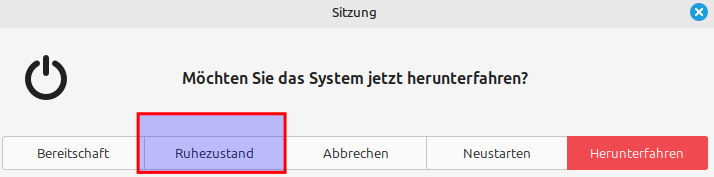
Neustarten, danach sieht das Menü so aus, der Ruhezustand ist eingefügt: