
Proxmox Wartungsmodus / Maintenance Mode - Diasable / Enable VMS at Start
Beschreibung
Man möchte den Server mehrmals neustarten, dann nervt es doch, wenn alle VMs/CTs mit starten.
Mit folgendem Script kann man das ein und auschalten
Installation des scriptes
Auf den Server einloggen (sollte es ein Cluster sein, braucht das nur auf eine Node gepackt werden)
Nun eine Neue Datei erstellen
nano /root/maintenance.shDen Inhalt einfügen
Quelltext ein/ausklappbar
#!/bin/bash

# ---------------------------------------------------------
#                 Proxmox Maintenance Mode
#  -Darkhand81
#  https://github.com/Darkhand81/ProxmoxMaintenanceMode
#  Temporarily disable all VMs/CTs that are set to autoboot
#  at node startup to allow for node maintenance.
#
# ---------------------------------------------------------

# ---BEGIN---

# Require root
if [[ $EUID -ne 0 ]]; then
    echo "$0 is not running as root. Try using sudo."
    exit 2
fi

# Pathname of the lockfile that signals the script that we are in
# maintenance mode.  Contains the VMs/CTs that were disabled so they
# can be re-enabled later:
lockfile="/root/maintmode.lock"

# ---------
# Functions
# ---------

# Enable maintenance mode - Query all instances, check which are set to
# start at boot, record and disable them.
function enable_maintmode(){

  echo "Disabling (and saving) current onboot settings:"

  # List all VMs, filter only the first word, then filter only numerics (IDs):
  for vm in $(qm list | awk '{print $1}' | grep -Eo '[0-9]{1,5}')
  do
    # Of those, query each VMID and search for those with onboot: enabled:
    for vmstatus in $(qm config $vm | grep "onboot: 1" | awk '{print $2}')
    do
      #Save matching IDs to the lockfile, prepend with VM to identify as a VM:
      echo "VM$vm" >> $lockfile
      # Disable onboot for matching VMIDs:
      qm set $vm -onboot 0
    done
  done

  # Repeat for CTs as they use a different command to enable/disable:
  for ct in $(pct list | awk '{print $1}' | grep -Eo '[0-9]{1,5}')
  do
    for ctstatus in $(pct config $ct | grep "onboot: 1" | awk '{print $2}')
    do
      # Prepend with CT to identify as a container:
      echo "CT$ct" >> $lockfile
      # Disable onboot for matching containers:
      pct set $ct -onboot 0
      # pct currently doesn't provide an output like qm does, so simulate it here:
      echo "update CT $ct: -onboot 0"
    done
  done
}

# Disable maintenance mode - Parse the lockfile and re-enable onboot
# for those IDs:
function disable_maintmode(){

  file=$(cat $lockfile)
  echo -e "\nRe-enabling previous onboot settings:"

  for line in $file
  do
    # For each line starting with VM, run the qm command to enable VM onboot:
    for vm_on in $(echo -e "$line" | grep 'VM' | cut -c 3-)
    do
      qm set $vm_on -onboot 1
    done
  done

  for line in $file
  do
    # For each line starting with CT, run the pct command for CTs:
    for ct_on in $(echo -e "$line" | grep 'CT' | cut -c 3-)
    do
      pct set $ct_on -onboot 1
      # pct currently doesn't provide an output like qm does, so simulate it here:
      echo "update CT $ct_on: -onboot 1"
    done
  done

  # Remove the lockfile as we want to signal that we are out of maintenance mode:
  rm $lockfile
}

# -----
# Start
# -----

# If the lockfile doesn't exist, we want to enable maintenance mode (disable onboot).
# Otherwise we want to disable maintenance mode (enable onboot):
if [ ! -f "$lockfile" ]; then
  echo
  read -p "Enable maintenance mode and disable all current VM/CT bootup? (y/n) " CONT
    if [ "$CONT" = "y" ]; then
      enable_maintmode;
      echo -e "\nMaintenance mode is now enabled! VM autostart is disabled. Run this script again to re-enable."
    else
      echo "Exiting.";
      exit
    fi
else
  echo
  read -p "Maintenance mode is on! Re-enable previous VM/CT bootup? (y/n) " CONT
    if [ "$CONT" = "y" ]; then
      disable_maintmode
      echo -e "\nMaintenance mode is now disabled! All VMs/CTs that were previously set to autorun will do so at next bootup."
    else
      echo "Exiting.";
      exit
    fi
fi
Ausführbar machen
chmod +x /root/maintenance.shBedienung
Das script starten
. /root/maintenance.shFrage mit Y beantworten wenn der Wartungsmodus gestartet werden soll

Nun wird der Autostart deaktiviert

Möchte man den Wartungsmodus beenden, einfach das script nochmals aufrufen und mit y bestätigen das man den Wartungsmodus wieder verlassen möchte
. /root/maintenance.sh
Nun werden die VMs die vorher starten drin hatten auch wieder aktiviert
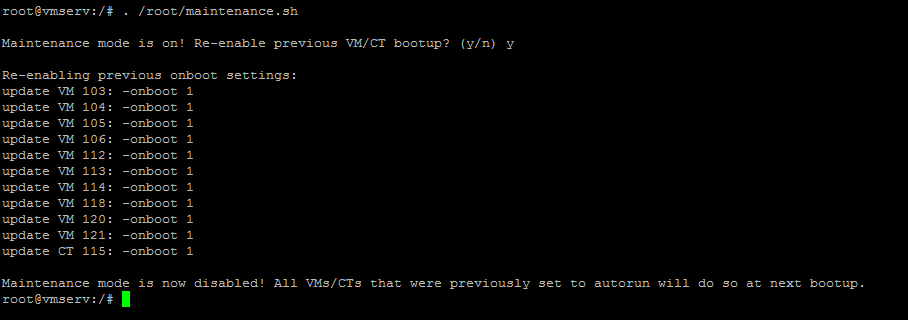
Voila, Fertig
Ein großen Dank an den ersteller des Scriptes
Quelle : https://github.com/Darkhand81/ProxmoxMaintenanceMode