
Nach Linux update im lxc container, container startet nicht mehr
Beschreibung:
Proxmox Version 7 unterstützt nur officell Container bis Linux Debian 11 / buster
nach dem restart startet es nicht mehr.
in 7 Container nicht auf 13 aktualisieren!!!
Wichtig, erstmal auf Version 7 apt update, full upgrade machen, wenn fehler immer noch besteht dann:
Fehler:
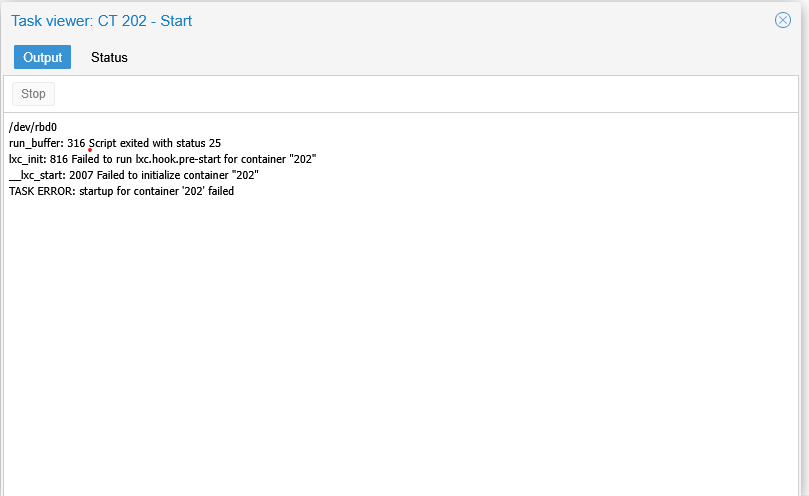
Mit
pct start ctid --debugBekommt man folgende Ausgabe:
/dev/rbd0
run_buffer: 316 Script exited with status 1
lxc_init: 816 Failed to run lxc.hook.pre-start for container "202"
__lxc_start: 2007 Failed to initialize container "202"
-pve-prestart-hook" for container "202", config section "lxc"
DEBUG    conf - conf.c:run_buffer:305 - Script exec /usr/share/lxc/hooks/lxc-pve-prestart-hook 202 lxc pre-start produced output: Can't call method "unified_cgroupv2_support" on an undefined value at /usr/share/perl5/PVE/LXC/Setup.pm line 428.

DEBUG    conf - conf.c:run_buffer:305 - Script exec /usr/share/lxc/hooks/lxc-pve-prestart-hook 202 lxc pre-start produced output: error in setup task PVE::LXC::Setup::unified_cgroupv2_support

ERROR    conf - conf.c:run_buffer:316 - Script exited with status 1
ERROR    start - start.c:lxc_init:816 - Failed to run lxc.hook.pre-start for container "202"
ERROR    start - start.c:__lxc_start:2007 - Failed to initialize container "202"
INFO     conf - conf.c:run_script_argv:332 - Executing script "/usr/share/lxcfs/lxc.reboot.hook" for container "202", config section "lxc"
startup for container '202' failed
durchführen
die container Datei öffnen

/etc/pve/lxe/<LXCID>.conf

öffnen und dort unter ostype unmanaged eintragen.


Beispiel:

Vorher in ostype

arch: amd64
cores: 2
hostname: kerio
memory: 4096
nameserver: 8.8.8.8
net0: name=eth0,bridge=vmbr0,gw=192.168.1.200,hwaddr=02:03:8B:30:65:C4,ip=192.168.1.20/16,ip6=auto,type=veth
onboot: 1
ostype: debian
rootfs: rbd_ct:vm-202-disk-1,size=450G
swap: 1024


nachher ostype in unmanaged ändern

arch: amd64
cores: 2
hostname: kerio
memory: 4096
nameserver: 8.8.8.8
net0: name=eth0,bridge=vmbr0,gw=192.168.1.200,hwaddr=02:03:8B:30:65:C4,ip=192.168.1.20/16,ip6=auto,type=veth
onboot: 1
ostype: unmanaged
rootfs: rbd_ct:vm-202-disk-1,size=450G
swap: 1024
if not start then
Edit:
nano /usr/share/perl5/PVE/LXC/Setup/Debian.pm
Dort diese sektion muss so aussehen
 die "unable to read version info\n" if !defined($version);

    # translate testing version and os-release incompat derivates names
    my $version_map = {
        'stretch/sid' => 9.1,
        'buster/sid' => 10,
        'bullseye/sid' => 11,
        'bookworm/sid' => 12,
        'trixie/sid' => 13,
        'forky/sid' => 14,
        'kali-rolling' => 12,
        };
    $version = $version_map->{$version} if exists($version_map->{$version});
dann
Finde:
die "unsupported debian version '$version'\n" if !($version >= 4 && $version <= 11);ändern in:
die "unsupported debian version '$version'\n" if !($version >= 4 && $version <= 12);
Dann dDienst neustarten:
systemctl restart pvedaemon pve-cluster pveproxy