
Einrichtung Email mit dem Nullmailer (Eine alternative zu Postfix)
Beschreibung
Der Nullmailer ist ein einfaches SMTP-Forwarding-System, das Sie verwenden können, um Benachrichtigungen aus Checkmk an Ihre E-Mail-Adresse weiterzuleiten. Hier sind die Schritte, wie Sie den Nullmailer in Checkmk einrichten.
Installation
-
Installieren Sie Nullmailer auf dem System, auf dem Checkmk installiert ist. Je nach Ihrem Betriebssystem finden Sie hier Anweisungen zur Installation:
- Debian/Ubuntu:
sudo apt-get install nullmailer mailutils - Red Hat/CentOS:
sudo yum install nullmailer - SUSE:
sudo zypper install nullmailer

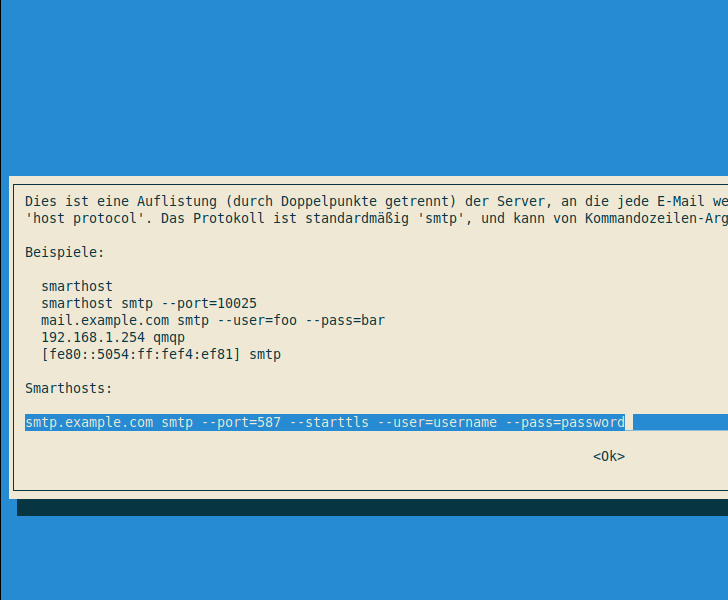
Sollte auf Ihrem System ein Konfigurationsassistent kommen, den Hostnamen kann man so lassen.
Und im zweiten Feld den Server und den Benutzer, Verschlüsselung, Kennwort und weiter benötigte Parameter eintragen. Am Ende des Artikels gibts noch Beispiele für verschiedene SMTP Server Beispiele.
- Debian/Ubuntu:
- Konfigurieren Sie Nullmailer, indem Sie einen gültigen SMTP-Server angeben. Dies können Sie in der Datei
/etc/nullmailer/remotestun. Wenn auf Ihrem System der Assistent bei Installtion des Pakets schon aufgerufen wurde, kann dieser Teil übersprungen werden.
Hier ist ein Beispiel:
smtp.example.com smtp --port=587 --starttls --user=username --pass=password - Überprüfen Sie, ob Nullmailer korrekt funktioniert, indem Sie eine Test-E-Mail senden:
echo "Dies ist eine Test-E-Mail." | mail -s "Test-E-Mail" recipient@example.com - Wenn alles ordnungsgemäß eingerichtet ist, sollte die Test-E-Mail an Ihre E-Mail-Adresse gesendet werden. Von nun an sollte Checkmk Benachrichtigungen über Nullmailer an die angegebene E-Mail-Adresse senden.
Beispiele für die Verwendung von Parametern in der /etc/nullmailer/remotes
SMTP-Server ohne Authentifizierung:
smtp.example.com smtp --port=25SMTP-Server mit Authentifizierung (Base64-verschlüsselt):
smtp.example.com smtp --port=587 --user=username --pass=passwordSMTP-Server mit Authentifizierung und SSL/TLS (Port 465):
smtp.example.com smtp --port=465 --ssl --user=username --pass=passwordSMTP-Server mit Authentifizierung und STARTTLS (Port 587):
smtp.example.com smtp --port=587 --starttls --user=username --pass=passwordBitte beachten Sie, dass Sie für Ihre spezifische SMTP-Konfiguration möglicherweise weitere Optionen oder abweichende Portnummern verwenden müssen. Vergewissern Sie sich daher, dass Sie die richtigen Informationen von Ihrem E-Mail-Provider oder Systemadministrator erhalten, bevor Sie die /etc/nullmailer/remotes-Datei bearbeiten.
Der "auth login"-Parameter
in der /etc/nullmailer/remotes-Datei wird verwendet, um den SMTP-Authentifizierungstyp anzugeben, der beim Verbinden mit dem SMTP-Server verwendet werden soll.
Wenn der SMTP-Server die "SMTP AUTH LOGIN"-Authentifizierung unterstützt, können Sie den "auth login"-Parameter wie folgt verwenden:
smtp.example.com smtp --port=587 --auth-login --user=username --pass=passwordMit dem "auth login"-Parameter wird angegeben, dass die Authentifizierung über die "SMTP AUTH LOGIN"-Methode durchgeführt werden soll, bei der Benutzername und Passwort in Base64-verschlüsselter Form übertragen werden.
Bitte beachten Sie, dass nicht alle SMTP-Server die "SMTP AUTH LOGIN"-Authentifizierung unterstützen. Stattdessen können Sie andere Authentifizierungsmethoden wie "SMTP AUTH PLAIN" oder "SMTP AUTH CRAM-MD5" verwenden, aber das hängt von Ihrem SMTP-Provider ab. Es ist daher wichtig, die richtigen Informationen von Ihrem E-Mail-Provider oder Systemadministrator zu erhalten, bevor Sie die /etc/nullmailer/remotes-Datei bearbeiten.
Fehlersuche
Wenn das Versenden einer Email nicht funktioniert, können Sie in der /var/mail.log nachschauen.
Nullmailer legt die Logdatei dort rein.
Ein Fehlerbeispiel:
cat /var/log/mail.log
Feb  9 11:22:40 checkmk nullmailer-send[20616]: Rescanning queue.
Feb  9 11:24:02 checkmk nullmailer-send[20616]: Trigger pulled.
Feb  9 11:24:02 checkmk nullmailer-send[20616]: Rescanning queue.
Feb  9 11:24:02 checkmk nullmailer-send[20616]: Starting delivery, 1 message(s) in queue.
Feb  9 11:24:02 checkmk nullmailer-send[20616]: Starting delivery: host: meinedomain.de protocol: smtp file: 1675938242.21098
Feb  9 11:24:02 checkmk nullmailer-send[20616]: From: <root@checkmk.local.lan> to: <dest@gmail.com>
Feb  9 11:24:02 checkmk nullmailer-send[20616]: Message-Id: <1675938242.567604.21097.nullmailer@checkmk.local.lan>
Feb  9 11:24:02 checkmk nullmailer-send[21099]: smtp: Failed: Server SSL/TLS certificate does not match hostname
Feb  9 11:24:02 checkmk nullmailer-send[20616]: Sending failed: Temporary error in sending the message
Feb  9 11:24:02 checkmk nullmailer-send[20616]: Delivery complete, 1 message(s) remain.
Feb  9 11:25:02 checkmk nullmailer-send[20616]: Rescanning queue.
Feb  9 11:25:02 checkmk nullmailer-send[20616]: Starting delivery, 1 message(s) in queue.
Feb  9 11:25:02 checkmk nullmailer-send[20616]: Starting delivery: host: meinedomain.de protocol: smtp file: 1675938242.21098
Feb  9 11:25:02 checkmk nullmailer-send[20616]: From: <root@checkmk.local.lan> to: <dest@gmail.com>
Feb  9 11:25:02 checkmk nullmailer-send[20616]: Message-Id: <1675938242.567604.21097.nullmailer@checkmk.local.lan>
Feb  9 11:25:02 checkmk nullmailer-send[21137]: smtp: Failed: Server SSL/TLS certificate does not match hostname
Feb  9 11:25:02 checkmk nullmailer-send[20616]: Sending failed: Temporary error in sending the message
Feb  9 11:25:02 checkmk nullmailer-send[20616]: Delivery complete, 1 message(s) remain.
Feb  9 11:27:03 checkmk nullmailer-send[20616]: Rescanning queue.
Feb  9 11:27:03 checkmk nullmailer-send[20616]: Starting delivery, 1 message(s) in queue.
Feb  9 11:27:03 checkmk nullmailer-send[20616]: Starting delivery: host: meinedomain.de protocol: smtp file: 1675938242.21098
Feb  9 11:27:03 checkmk nullmailer-send[20616]: From: <root@checkmk.local.lan> to: <dest@gmail.com>
Feb  9 11:27:03 checkmk nullmailer-send[20616]: Message-Id: <1675938242.567604.21097.nullmailer@checkmk.local.lan>
Feb  9 11:27:03 checkmk nullmailer-send[21197]: smtp: Failed: Server SSL/TLS certificate does not match hostname
Feb  9 11:27:03 checkmk nullmailer-send[20616]: Sending failed: Temporary error in sending the message
Feb  9 11:27:03 checkmk nullmailer-send[20616]: Delivery complete, 1 message(s) remain.
Feb  9 11:31:03 checkmk nullmailer-send[20616]: Rescanning queue.
Feb  9 11:31:03 checkmk nullmailer-send[20616]: Starting delivery, 1 message(s) in queue.
Feb  9 11:31:03 checkmk nullmailer-send[20616]: Starting delivery: host: meinedomain.de protocol: smtp file: 1675938242.21098
Feb  9 11:31:03 checkmk nullmailer-send[20616]: From: <root@checkmk.local.lan> to: <dest@gmail.com>
Feb  9 11:31:03 checkmk nullmailer-send[20616]: Message-Id: <1675938242.567604.21097.nullmailer@checkmk.local.lan>
Feb  9 11:31:03 checkmk nullmailer-send[21328]: smtp: Failed: Server SSL/TLS certificate does not match hostname
Feb  9 11:31:03 checkmk nullmailer-send[20616]: Sending failed: Temporary error in sending the message
Feb  9 11:31:03 checkmk nullmailer-send[20616]: Delivery complete, 1 message(s) remain.
Was ist hier passiert. Der Domainname passt nicht zum Zertifikat. Warum. Wir haben als SMTP-Server
meinedomain.de angeben. Auf eminedomain.de lauscht zwar der smtp Server.
Aber das Zertifikat ist auf mail.meinedomaine.de ausgestellt.
Also muss in der remotesdatei als smtpserver mail.meinedomain.de angeben werden.
Und schon klappt der Versand.
Die Änderungen in der remotes Datei sind sofort wirksam, da nullmailer diese beim senden immer wieder neu einliest.
Also kein Dienst muss neugestartet werden.
Logauzug (Hier sind jetzt zwei Nachrichten drin, weil wir noch eine Email versendet haben) :
Starting delivery, 2 message(s) in queue.
Feb  9 11:42:39 checkmk nullmailer-send[20616]: Starting delivery: host: mail.mainedomain.de protocol: smtp file: 1675938242.21098
Feb  9 11:42:39 checkmk nullmailer-send[20616]: From: <root@checkmk.local.lan> to: <dest@gmail.com>
Feb  9 11:42:39 checkmk nullmailer-send[20616]: Message-Id: <1675938242.567604.21097.nullmailer@checkmk.local.lan>
Feb  9 11:42:40 checkmk nullmailer-send[21760]: smtp: Succeeded: 250 2.0.0 Ok: queued as 016091881A7C
Feb  9 11:42:40 checkmk nullmailer-send[20616]: Sent file.
Feb  9 11:42:40 checkmk nullmailer-send[20616]: Starting delivery: host: mail.meinedomain.de protocol: smtp file: 1675939359.21759
Feb  9 11:42:40 checkmk nullmailer-send[20616]: From: <root@checkmk.local.lan> to: <dest@gmail.com>
Feb  9 11:42:40 checkmk nullmailer-send[20616]: Message-Id: <1675939359.525504.21758.nullmailer@checkmk.local.lan>
Feb  9 11:42:40 checkmk nullmailer-send[21761]: smtp: Succeeded: 250 2.0.0 Ok: queued as 465411881AAF
Feb  9 11:42:40 checkmk nullmailer-send[20616]: Sent file.
Feb  9 11:42:40 checkmk nullmailer-send[20616]: Delivery complete, 0 message(s) remain.
Zustellung Erfolgreich.